
Fill Boundary Holes Modifier
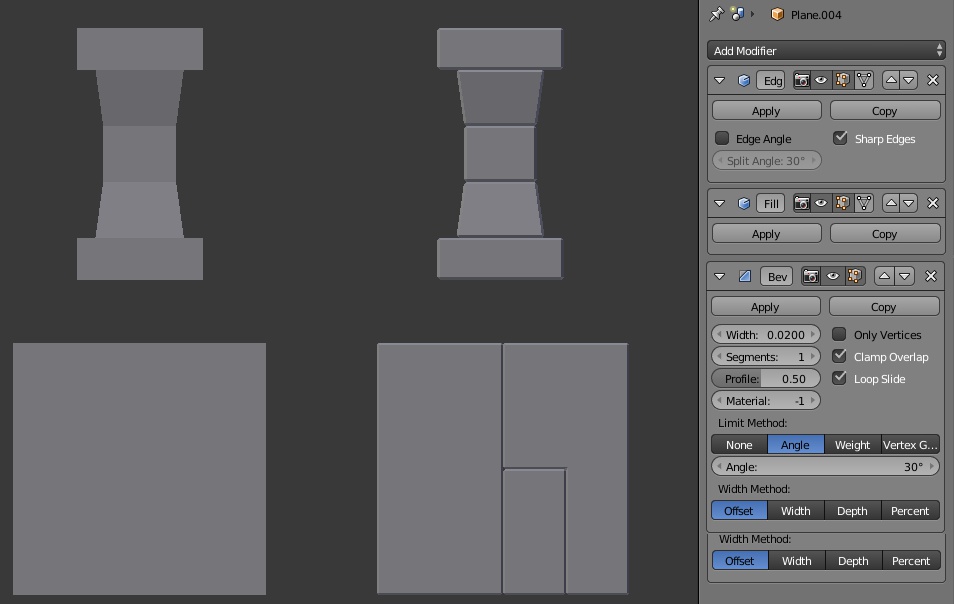
I suggest a new modifier: the Fill Boundary Holes modifier. it is useful in combination with an Edge Split modifier to fill holes then a bevel to generate stylized game assets. And by using modifiers you edit the meshes without the separations.
With this modifier you can imagine creating this kind of scene just by adding edge loops to create bricks: tobiaskoepp.artstation.com/projects/mK011
8 Comments
Came here to propose an option to cap the ends in the screw modifier, but this fill holes modifier would be better.
* @tomjk * same here. say you start the screw modifier with a circle offset x.5 and make a half a donut... the cap is literally the SOURCE of the equation. i have no idea why this isn't an option a decade ago.
You have to think of how it would behave on more complex meshes, like the Suzanne head for example. The modifier would certainly need more than "Apply" and "Copy".
This would be nice indeed, but it's not clear to me... how Blender could tell what are the holes to be closed?
How would the user specify what needs to be filled? This doesn't seem like something the software could reliably figure out on its own.
I rename it: Fill Boundary Holes. This allow to separate the meshes with the edge split then fill the holes. Then this allow to create this kind of asset and edit it easily just by placing edge loops: tobiaskoepp.artstation.com/projects/mK011
Just to be clear, it's closing the hole and not bridging, right? Doesn't that create a duplicate face? Not criticizing, just trying to understand.
Yes it's not bridging so it keeps the meshes separated to allow to create some stylized effects after with the bevel modifier. Right now to get this effect we need to apply the edge split modifier then fill the holes in edit mode and apply the bevel modifier. After that the mesh becomes hard to edit and if we do a remove double everything is mess up.