
Multiple render ranges and range-slide
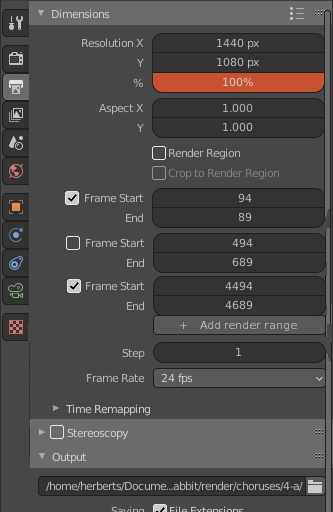
- Multiple render ranges : There's already a way to render different parts of an animation seperately from the command line ( see here ), but it would be nice to have a gui option too.
- Render range slide : Having the ability to move both start and end frame of the render range at the same time, like with one slider input, would be cool.
4 Comments
Try the Scene strips in the Sequence Editor, that lets you control the render range and/or in and out points of each camera. The Sequencer Node in this Compositor fork can combine the render ranges defined by Scene strips with the Node Editor: blender.community/c/graphicall/hpbbbc/ (Win, but there is also a Linux version).
It would be nice to add this to compositor output. Different ranges for different cameras. For example for camera_1 it is 0-100 for camera_2 it is 101-500.
* @Alexey * I s'pose right now one can do that by binding cameras to markers, so if render ranges behaved like markers (selectable, movable...) one could bind a camera to a render range.
* @jack.herbert * Yes, cool, it like a master camera. But sometime we need to render extra frames from start to end (30 frames for compositing purpose) and render cameras/shots to different folders. May be all cameras animation start from 0. It is good idea to add some properties to override range and camera in compositing File Output node {attachment 2020-09-05_11-58-48png} or add Camera node to override this and we can do complex render setup...