
Outliner - more precision for statistic information
Right now if collection or other object have more than 100 objects as child, then we see 99 only, this made some misunderstanding.
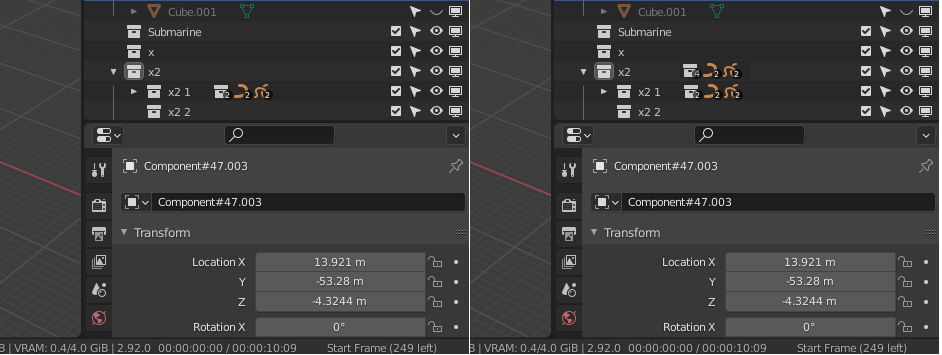
If collection have hierarchy with other collection then all collections are not counted, and in whole tree objects and collections are not sumarized, by this hard to manage objects (eg. divide for collections to do some balance as less 99).
Due this want suggest:
1 - Turn on/off the counts more than 99 in option (if someone want see more than 99 - why not? Icon can be shifted)
2 - Turn on/off the counts related objects as
SUM
from whole outliner, eg on primary collection/object (image)
3 - Turn on/off the
statistic information
- my idea was as:
- click right on collections or main Scene icon dir to change view organized with objects type as tree to list them and next all icons can be stat counters info
-
special view like "Scene Layer", "Scene" in **Display mode", eg.
Statisticorganized like line upper (just types and counters - then no 99 etc.)
4 - Turn on/off the counts as exist or not any (coz point 3 can solve this)
5 - Turn on/off the selected objects on outliner/viewport (
User persceptive - Selected: 101
)
6 - Turn on/off the selected objects on outliner/viewport Status bar (
Selected: 101
)
7 - In point.5,6 can be problem how to count (all or with separation for objects). Byt this ca be Turn on/off the Object Counter Table (Sheet) - it's probably good candidate for add-on (want see my employers progress, like on LOC around coding ;p - the objects progress)
Left orginal, Right modified
0 Comments