
Allow locking the aspect ratio of the UV:s
Currently every time you unwrap an object in Blender, for example a square plane, Blender creates the uv-island for the object. With that plane it would create a square uv-island.
Let's say your image texture also is a square, so it fits perfectly to the plane and you can happily keep blending without noticing anything weird.
In an alternative situation you load some other image that is not square, but instead is a rectangle. Then Blender will distort the uv-island to fit the aspect ratio of that new texture, which will cause you to be having a bad looking distorted texture.
In a generic example, you want to create an animation where you have all the flags of the world (that are not sharing the same aspect ratio) mapped to the same plane. This will lead into a disaster, because Blender doesn't allow you to have the flags keep their proportions.
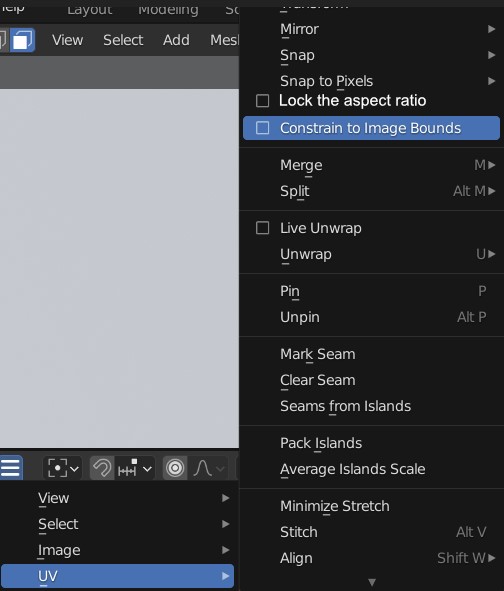
So, my proposal is to allow us to lock the aspect ratio to stay in the original proportions. You should maybe even be able to lock the original UV scale if needed so that it doesn't change with the texture. Or maybe you should be able to lock only U or V, so that the island would scale to fit the selected axis only.
In the flag example, you would just clip to alpha every time a flag doesn't fit the original proportions. That can be really handy in many situations where you can repeat the image or extend or clip to alpha.
In the image, its one good location where such setting could be, but I wouldn't be against if the image sequence node and image node also had a link to this setting.
2 Comments
That option make no sense. UV is not tied to texture proportions so there is no "locking" available to do. UV is normalized to 0-1.
So what You want is operator to transform UV to other proportions. Unwrap operators already have option to ignore loaded image proportion.
I think unwrapping the object again to every frame is not an option. (or is it?).
I am not a programmer or a math expert, but I think we should have some way to lock the UV:s being the same way as they are in the first unwrap. From the user perspective it looks like that Blender will distort the UV-island after I load new texture. What really happens under the hood is beyond my knowledge.
So, basically if I unwrap the UV island to be square, I think I should have a way to lock it to be staying square even if I load some other image.
Maybe we then should have an option to tie it to the texture proportions, if that allows us to fix this? Blender could use some generated units for the UV:s based on the image pixels or something to know the aspect ratio. Then just allow us keeping it.