
Option to control how many edge loops are added when using Skin Modifier
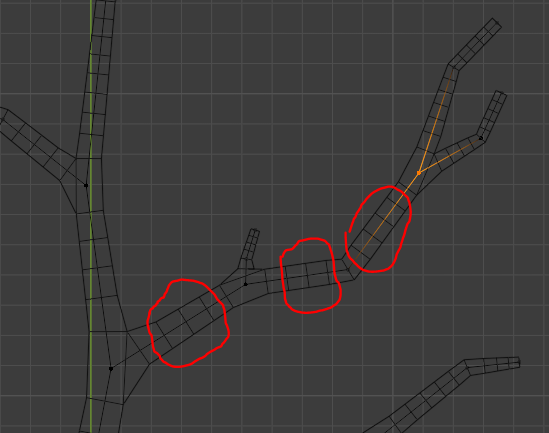
When using the Skin Modifier, edgeloops are added based on the length of an edge and there is no way of controlling this. I'm guessing this is meant to put out a mesh with approximately evenly sized quads, but an option to disable this and only put out the minimum number of loops needed for the shape would make certain modeling tasks much easier. At the moment you have to remove these cuts manually if you don't want them or try to use the Decimate Modifier set to Planer Mode which creates bad NGon results.
4 Comments
I tired to limited dissolve a similar mesh to make quads, but it created n-gons. Good feature request.
* @qwertquart * try the optiloops addon after applying the modifier
I think this is a very important request. Definitely should be implemented.
Just ran into this issue when trying to animate lightning/electricity with a displacement modifier. I have a 4m line made of 28 verts and with a mean radius of 0.001 that tapers off towards both ends, with the skin modifier I get over 8900 verts (110 verts resulted in roughly 17000 verts). If you want to animate and instance the object a couple of times the skin modifier isn't viable.
Granted, this is an extreme edge case, but the skin modifier could have handled it well if you could specify a factor to reduce the number of subdivisions (or just a hard limit).