
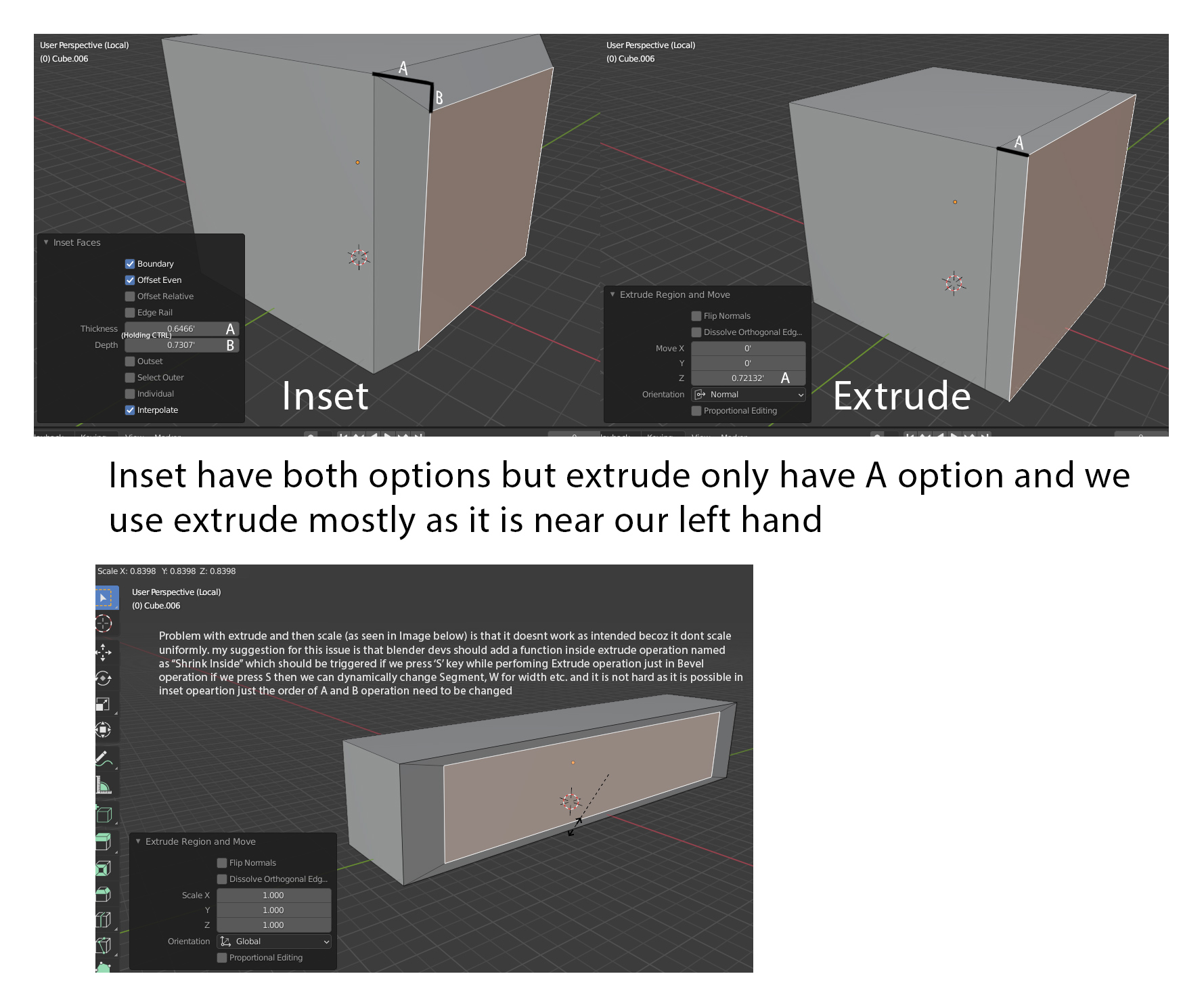
Extrude modifier function and inset at the same time.
Just as we have both options like to move the extruded part in normal direction and inside using Inset options as we can hold CTRL while inserting to move the extruded vertices upward while inserting and by default the inset function work with zero extrusion. See the pic for better understanding.
3 Comments
This is pretty much extruding polygons, like you can in most 3d apps.... and yes, this is something that is missing in blender's extrude tool...
this is basically how Modo's bevel tool works.. it's a combination extrude/inset. one of the hardest adjustments I made switching to Blender many years ago was the lack of a combination extrude/inset. It'd be great to have as an option for sure
This is how also Extrude in Maya works, just instead of pulling the face away, one might just scale it, and achieve what Inset is doing.
In Maya every tool has transform gizmo, which allows user to freely transform newly created geometry, including subdivisions, e.g. after extruding the face, one might rotate and scale it and see how the subdivisions change with it, change the number of subdivisions.
Meanwhile, from my little experience in Blender, here one would extrude, then transform, then add subdivisions, which is not a direct result of Extrusion and requires planning in advance.
With this update one can get same and better result with lesser number of tools.