
Preferences - Region Overlap
Do you want transparent Tool shelf (T) or Properties (N)?
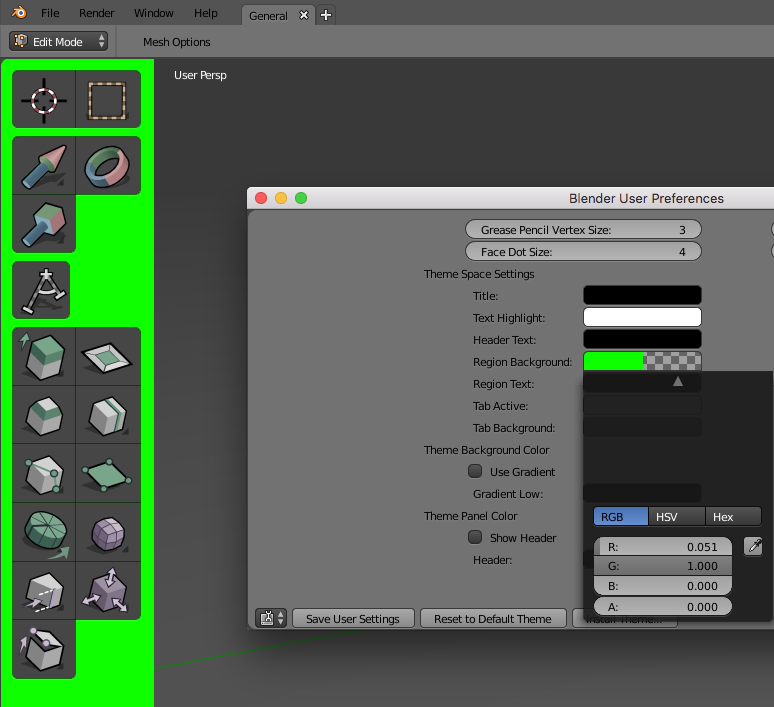
Scenario: Go to "User preferences" > "Themes" and change alpha of "Region Background". But nothing happened ?!? Why? You need to go "System" tab and activate "Region overlap" first.
Problem: How someone can discover to search for "Region overlap" in system without looking for tutorial?
Solution: Popup warning message if user tries to change Alpha and Region Overlap is unchecked. Something like "For region transparency enable Region overlap in System panel first."
Or let "Region overlap" enabled by default. Or remove checkbox entirely from System panel. Or does it has some preformance influence?
2 Comments
For region overlap to work, the GPU driver had to support Triple Buffer drawing, which wasn't available for older GPUs. The way Region Overlap worked also suffered serious performance issues. That's why it had to be a system option, not a theme one. With the OpenGL 3.3 minimum requirement of 2.80, we can use methods that don't require Triple Buffering and that don't cause performance issues. Hence the Region Overlap option can be removed from the system settings.
See e01cadd657c76 .
Or, simply move the "Region Overlap" option under the Region's theme options.