
Alt to change multiple interpolation settings in graph editor
Throughout most of Blender, holding down the Alt key while making a change will make the change across all selected objects, not just the active object. I'd like to suggest that this convention is carried forward to the graph editor.
Example
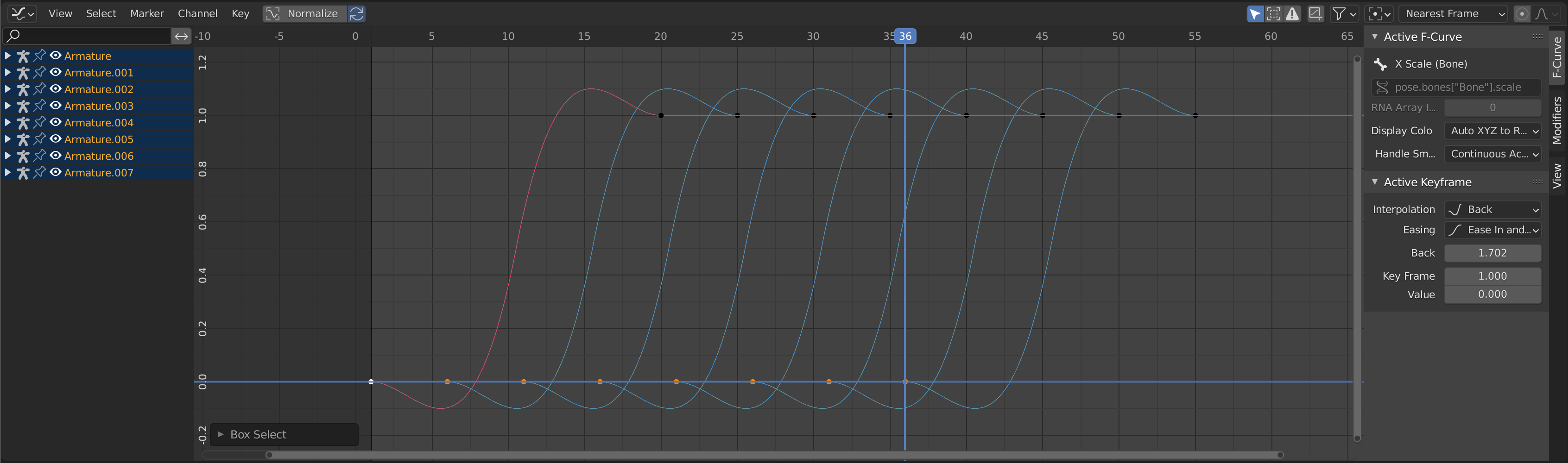
In motion design, you often use the same keyframes staggered in time to create a nice build in/out effect.

These keyframes are animating the scale of 8 bones in the scene. If I want to change the easing from 'Automatic' to 'Ease In and Out' for each of the keyframes, currently I have to do this for each keyframe one by one, which can be very slow. The same is true for changing the 'back' value. As these keyframes are for scale, there's three updates for each bone (x,y & z scales), meaning that updating the scale of these 8 bones will require 24 very simple, repetitive and time consuming changes.

If we have a particularly complicated scene, maybe where there's tens or even hundreds of repeating keyframes like this, making these changes manually is very time consuming, verging on impractical and limits how much the animator can experiment.
Solution
Enable the alt functionality in the graph editor. Each keyframe selected could have their Interpolation, Easing, Back, Amplitude, Period, Frame and Value settings all updated at the same time if the user is holding down the alt key.
In the example above, adding alt functionality to the graph editor will bring the 24 changes down to a single change. In the grand scheme of things, this will save an artist an insane amount of time.
This solution will bring the graph editor in-line with the rest of Blender for the alt functionality and will be a godsend for motion designers in particular.
3 Comments
Hard agree.
100% agree. Blender needs to support editing of multiple properties in general a bit better, but the graph editor is one that really stands out to me.
Not sure when it happened or if it's because of this request, but this is now in Blender. So very cool! 😊