
Reflections on Viewport Performance
Hi everyone! Let me start by saying this isn't a feature request or proposal. I just want to share some thoughts about viewport performance. I couldn't think of a better place to post these reflections to discuss them with others. My apologies in advance to the site admins.
A while ago, I read a developer's post discussing why 3D sculpting artists tend to prefer Zbrush over Blender. Among the reasons mentioned were:
Poor sculpting brush performance (developers have done incredible work and improved performance up to 8 times, if I recall correctly);
Lack of sculpting layers (currently in development).
These are significant reasons, but I'd like to address another one not mentioned in that post – viewport performance.
Currently, on my PC (Ryzen 7 7700, 64GB RAM, RTX 4060 Ti 8GB), interacting with the viewport becomes impossible at around 75 million polygons. It doesn't matter whether I'm using Vulkan or OpenGL. I was very puzzled by this and thought the issue might be my relatively weak GPU, so I asked a friend to test viewport performance on his RTX 4080. The result was practically the same – 85-90 million polygons.
Viewport performance is a significant drawback that will hinder Blender's adoption in modern studios. Artists won't be able to see the full picture of their completed model and will be forced to constantly reduce the subdivision levels of each object to avoid discomfort.
Perhaps a solution would be to add a function to Object Mode similar to what Multires has in Sculpt Mode ("Fast Navigate"), which reduces subdivisions to the first level during camera movement to lessen the hardware load.
I still can't reach any practical maximum polygon limit for the entire project. Even with hidden objects and subdivision levels considered, my project totals around 200 million polygons or more.
I don't know if solving the viewport issue is possible. I'm just sharing my thoughts as a regular user because I love Blender and its development team.
13 Comments
Hi and thanks for the feedback. Just to understand the issue better, what action is slow. Navigating the view or sculpting in general. Is the viewport also slow when outside sculptors? If it is reproducible with a subdivided sphere I can quickly have a look at which bottleneck you’re seeing.
Another thing that would help is to check with Pablo to add a sculpt file as demo file. Developers are no artists and good example files can be essential in solving bottlenecks.
Hi, I'm really glad to receive a response to my thoughts! I'm referring to viewport performance. When the total polycount of the entire model reaches 75 million polygons (this threshold is relevant for my PC configuration), Blender's viewport starts lagging severely and becomes almost unusable.
I'm not a professional 3D artist, but even my models already reach around 200 million polygons in total (a single face with added details like pores can have a resolution of 18 million polygons or more). I hope I won’t be mocked for comparing Blender and ZBrush out of curiosity xD. The maximum Multires level on each object varied between 6 and 7, but I couldn’t export such a high-poly model at once, and I didn’t want to spend too much time since it wasn’t meaningful in the testing context. I imported 133 objects into ZBrush, each at Multires level 4–5. Then I manually dropped subdivision levels on each object and began subdividing them one by one, achieving a total polycount of 323 million. ZBrush’s viewport froze but remained usable (I could still move and rotate the camera), whereas Blender refuses to respond properly to camera actions at 80 million polygons. If I try to push it to 100 million, Blender 4.5 beta running on Vulkan crashes with an emergency exit error and suggests restarting. Because of this, I constantly have to monitor the total polycount in the scene to avoid hitting the 75 million mark, which prevents me from seeing the full model with all its details.
Perhaps ZBrush’s viewport remains functional at high polycounts because when interacting with the camera, mesh subdivisions drop to the first level and restore after camera interaction ends. The Fast Navigate feature of the Multires modifier works exactly the same way, but only in Sculpt Mode—strangely, this functionality isn’t available in Object Mode for all objects with this modifier.
I’m sharing this to help developers better understand artists’ needs. Blender is open-source software where anyone can contribute to developing this brilliant 3D editor—whether by writing code or suggesting features.
I have more thoughts about features that could be added to Blender—like a remesher that builds clean topology, freeing artists from manually retopologizing assets (e.g., clothing exported from Marvelous Designer). But this isn’t the most critical tool needed right now. Far more important are sculpting layers and viewport performance.
Thank you so much for taking the time to read my post and this comment. I’m thrilled to discuss Blender with you. My project file is currently 5GB—if you’d like to research or test it, I can upload it to Google Drive or any platform per your request.
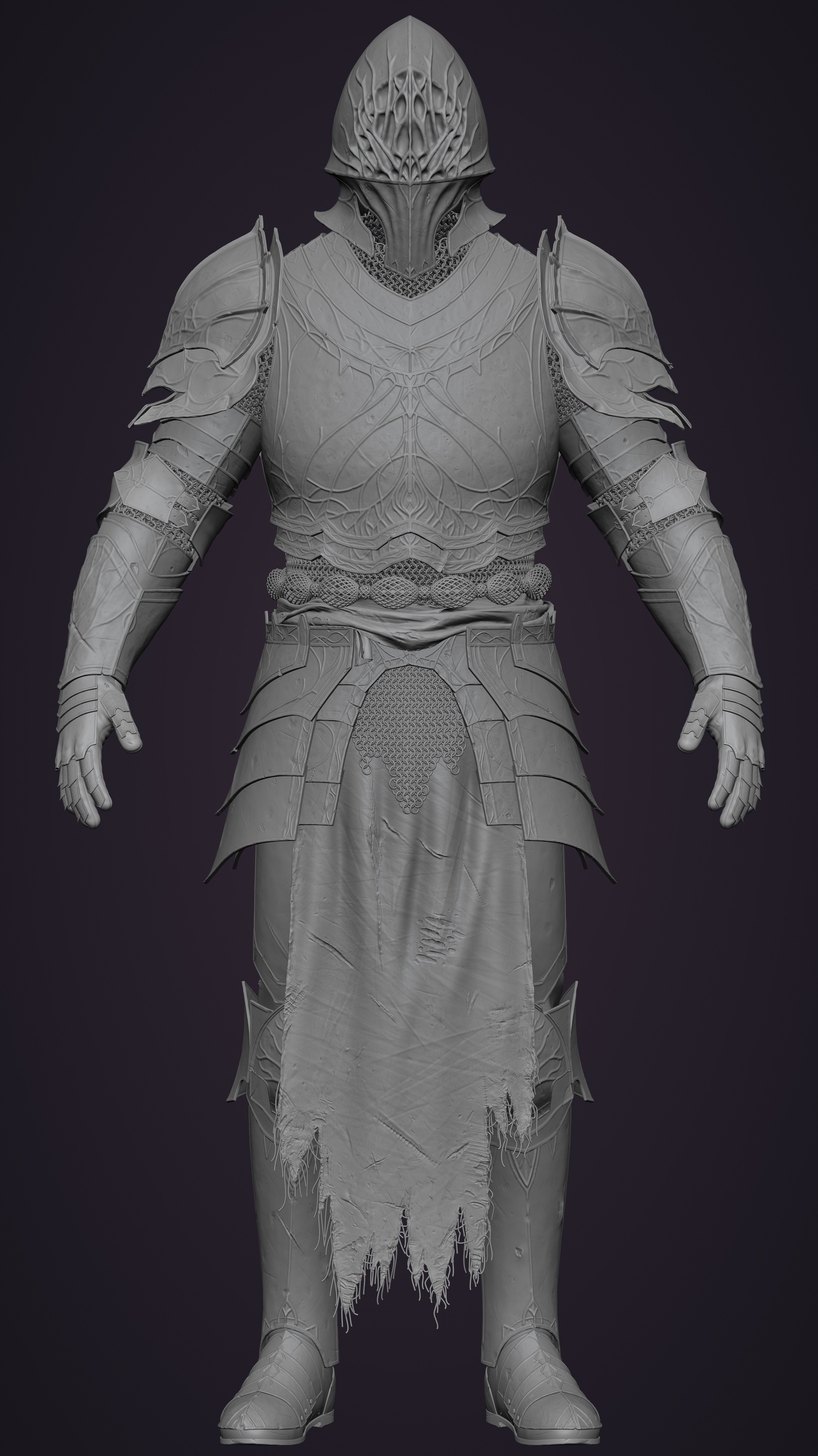
I've made some edits to the post and inserted an image of my current project.
AFAIK ZBrush's viewport performance advantage primarily comes from its proprietary Pixol rendering system rather than traditional polygon rasterization. Instead of pushing millions of triangles through the graphics pipeline like conventional 3D software, ZBrush renders using "pixols" (pixel + voxel) - essentially storing depth and material information per screen pixel (in fact when you start a zbrush "document", you still have to chose a "canvas size" because zbrush was at first a 2d drawing software, and it's through this canvas that you see your model).
This fundamentally sidesteps the polygon bottleneck that brings other software to its knees with high-density meshes. The system works by painting depth information directly to the screen buffer rather than calculating vertex transformations and triangle rasterization for every polygon. When you're viewing a 10M+ polygon model, you're essentially seeing a 2D depth-based representation that updates in real-time, not millions of actual polygons being rendered.
This is combined with automatic LOD systems, optimized memory management, and GPU acceleration, but the pixol rendering is the core that makes the "impossible" polycount performance possible.
IDK if that can be reproduced, let alone for a generalist tool like Blender. Other dedicated softwares like Nomad Sculpt seem to have found solutions to get polycount in the millions on iPad, which is impressive for a mobile device. Other softwares like 3D Coat rely on voxels for sculpting instead of polygons, but still have to output polygons eventually.
Yes, indeed. Some time ago, I took an interest in this topic, which is why I wanted to discuss it with the developers. Given your deep involvement in improving Blender, they’re well-positioned to assess the feasibility of such proposals.
Are you using fast navigation? Unless your GPU is quite old, Blender's viewport performance should actually be much better than Zbrush's, it's not even close actually. Are you sure you're not filling your VRAM when you reach 75 mil? That might be the issue.
Multires modifier has CPU bottlenecks. Sadly adding a bigger/faster GPU will not solve that. IIRC the developers of the sculpting painting and texture module are looking for solutions. Current state can be read here projects.blender.org/blender/blender/issues/135896
You can find my PC configuration by reading the post carefully. I know that Fast Navigate works perfectly, but why isn't it available in Object Mode? Even ZBrush will start lagging at around 50 million polygons when moving the camera if it doesn't drop the subdivision levels of all objects in the scene down to level 1. That's why I think adding Fast Navigate to Object Mode could help increase viewport performance. I believe it's implemented in ZBrush for a good reason.
What exactly does the CPU bottleneck affect? In my reasoning, I'm writing about viewport performance in Object Mode with high polygon counts — it's unlikely that the CPU can influence this.
I'll need to investigate that.
Ok
Adding fast navigation to object mode shouldn't be an issue.
Just to be clear: can you confirm you are not lagging in sculpt mode with fast navigation on? Currently, lagging in object mode with tens of million of polygons is expected, because you are actually rendering the whole mesh (max multires level) instead of the level 1 mesh (which is what happens when fast navigation is on and it's the same exact thing ZBrush does).
Though a 4080 should be so powerful that you should be able to somewhat navigate even at very high poly counts, especially if you use matcap lighting. So there might be something else that's going wrong.
Yes, I indeed experience no lag in Sculpt Mode with Fast Navigate enabled. My entire argument centers on the need to implement Fast Navigate in Object Mode and optimize Blender to handle extreme polygon counts, enabling it to compete directly with ZBrush.
Until this is implemented, studios will continue choosing ZBrush solely for its superior performance. I’m not referencing established pipelines or proprietary add-ons in existing studios here – this addresses either studios formed by next-generation artists over time, or existing studios transitioning to Blender due to the influx of young specialists trained in 3D via Blender, empowered by its sheer volume of learning resources, free accessibility, and open-source community.
It's important to understand that while a model with over 70 million polygons would cause Blender to lag and become difficult to use, the situation in ZBrush wouldn't be much better. In ZBrush, you would also face significant slowdowns with viewport navigation and operations like undoing; the experience would be far from smooth.
Another crucial point is that Blender's performance with high polygon counts is GPU-dependent, while ZBrush's performance relies on the CPU. Therefore, if you have a weak CPU but a powerful GPU (like an RTX 4090), ZBrush's performance could actually be worse than Blender's, feeling considerably less fluid.