
EEVEE Ray Tracing contribution control
Currently when you turn Ray Tracing on in EEVEE it globally activates it for diffuse, specular and world lighting. With no way to customize the contribution.
However many users including myself sometimes want to for example only have reflections but no bounce lighting on diffuse (like how it looked when you only turned on Screen Space Reflections in Legacy EEVEE).
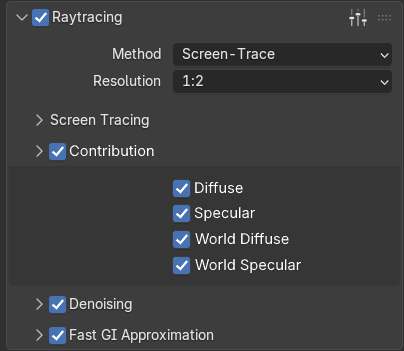 Here's a mockup of how this could look like on the user side. Disabling a contribution would make it specifically appear as if Ray Tracing was disabled.
Notably I've added individual options for World lighting, which nicely leads me to EEVEE's denoising blur issue and how this could help with it.
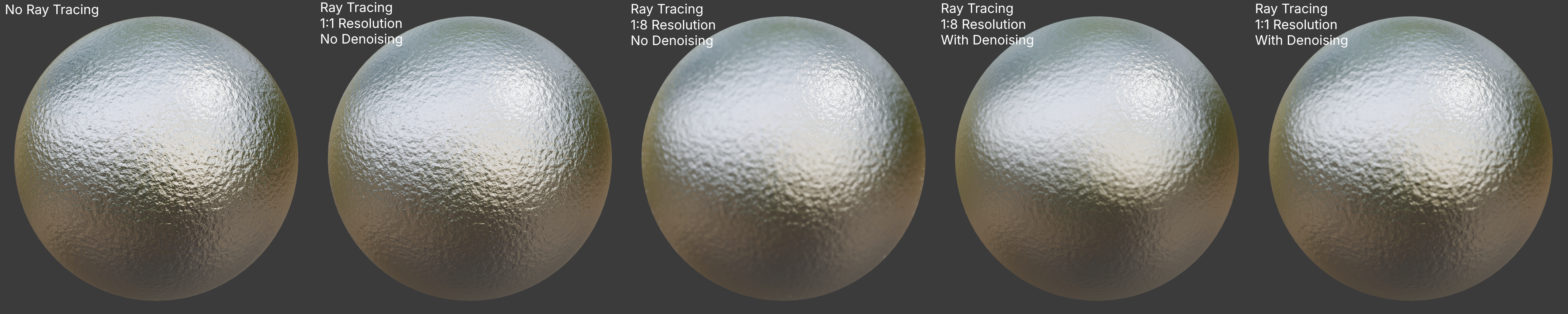 Here is a demonstration of Ray Tracing and denoising blurring world reflections, except for a single direct lighting highlight which does not get denoised.
Sphere 1 - perfectly usable
Sphere 2 - Also usable, in practice just appears higher roughness, although you'd get very noisy reflections in a real scene.
Sphere 3 - Unusable.
Sphere 4 - Unusable. Surprisingly near identical to sphere 5 which is at 1:1 resolution.
Sphere 5 - Still unusable though.
(Some other examples from Cartesian Caramel x.com/Cartesian_C/status/2012257894033490302 x.com/Cartesian_C/status/2012930868965253178 )
So the only usable configurations are to avoid Ray Tracing altogether (often impossible), or render without denoising at a higher sample count and/or rendering at higher resolution then scaling down. But unfortunately the latter will leave you with more render time and at 512-1024 samples shadows get extreme banding artifacts making doing it this way unviable either. At this point Cycles may render just as fast if not faster and leave you with give you better detail preservation even at 64 samples with OIDN denoising.
The option to exclude world lighting specifically from Ray Tracing while you'll still get some denoising blur from object reflections, you'll at least not get smudgy blur over the whole image, especially if your scene mostly relies on environment reflections which are usually good enough when Ray Tracing is off.
0 Comments