
Dynamic Custom Pivot with 3D Cursor Transform Pivot Point Option to "smartly" Generate Circular Arc of Motion for 'Loose' Bones in Keyframing Interpolation
Hello, Blenderfellows!
Fundamental to 3D Animation Workflows in my opinion, is a "smarter" Blender Pose Mode system which is capable to interprete (read and record) the will of the 3D Animator's intention, of 'drawing' in 3D space and time, as concrete F-Curve Interpolation, a mathematically accurate Arc of Motion through the very spontaneous 3D Cursor feature as a Temporary Pivot Object but that 'sticks' without any FK-behavior related depencency [such as Parenting Relation or Constraints mimmicking a Parenting Relation).
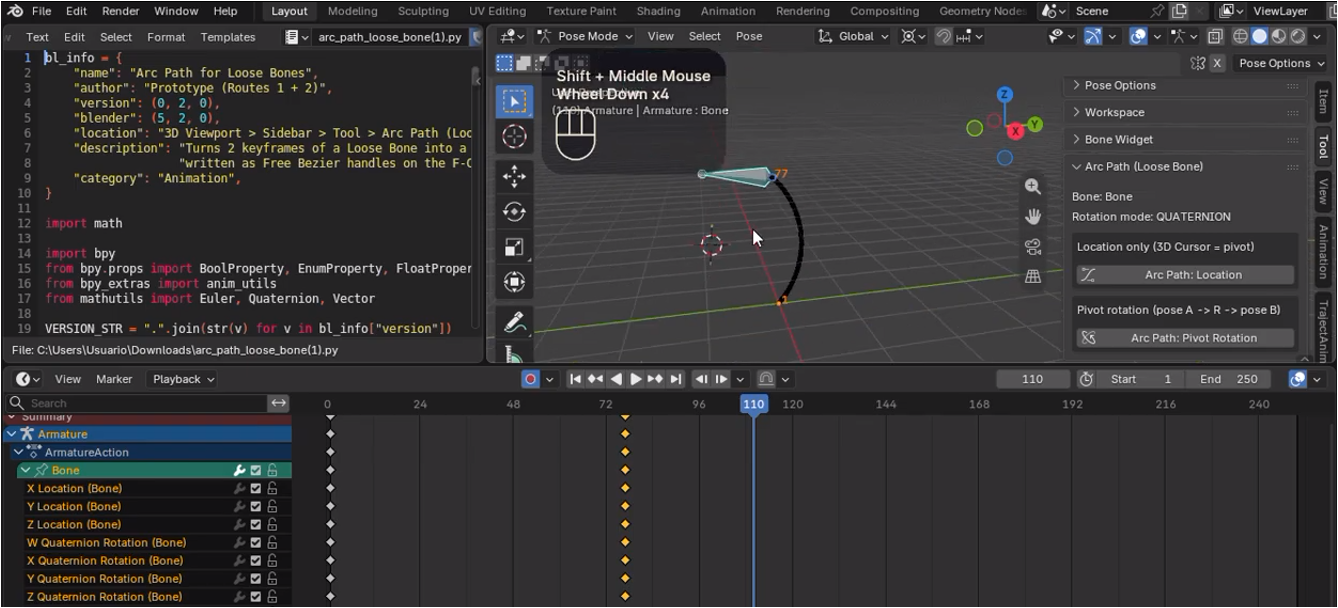
The concept of the 'Loose' Bone, is the term I use for a Bone that we can Grab and freely Move in 3D space (Location Transform), even though it may have a Parenting Relation (usually Disconnected/Offset) or some sort of Constraint that mimics a Parenting Relation, but we're actually Posing and Keyframing it in a freer way... but a way that by default in vanilla Blender very detrimental to 3D Animation, because of the typical cases of Master IK Foot/Hand/Head Bone Controllers relying on their Parent/'Fake-Parent' relationships in order to deliver one of the most basic techniques of traditional Animation, which is spontaneous way to accurately 'draw' (on paper, we often just imagine the Curvature on paper without necessarily drawing it) a Circular Arc of Motion in "4D" (3D space along time) in the case o Blender.
The video demonstration below that I've recorded indicates this implementation is no more a wish nor an intuition, though perhaps still a proof of concept; instead, it seems to be concrete reality as I have tested experimentally:
You can download the Python Script for your own use or investigation; made with the help of Claude AI assistant. But be aware this is an experimental version, not thoroughly tested nor revised, nor documented (I'll be doing this over time); but for any 3D Animator out there like myself wanting desperately to apply the feature in their projects already, or mayhap for any Programmer interested in analyzing the approach Claude employed for such code (I can provide the Chat if you're interested as well, just took 2 rounds of generated code), it seemed to me relatively reliable so far! I were using Blender 5.2.1 LTS.
Cheers!
0 Comments