← All ideas4 Mar 2019cartoon_shamanOpenUser Interfacecartoon_shamanAnthonyGuiziouIIIFGIIIShimoonbriecmuldoonfrederico4dmomotron2000testurevolkovroma56xmaiter01
attaching a sketch. I think it can avoid to open/closing modifier constantly
69.2%
Development Status:
Open
Upvote9Downvote4
c
cartoon_shaman
4 Mar 2019
20 Comments
V
Vyach
I would prefer Ctrl+A->Apply selected modifiers.
The same way as i can copy them with modifier tool.
Anybody skillede enough to modify addon?
{attachment 170337jpg}
2
L
Lauloque
+1
I would also like to be able to rightclick the modifier from the modifer list and have some contextual menu, indluding some actions like "apply selected", "apply all", ...
2
V
Vyach
*
@-L0Lock-
* yes, good too
J
Josephbburg
*
@ Vyacheslav
* Convert to Mesh applies all modifiers, not sure if this is what you want. But this would be easy to extend into your idea, with a Python script that hides/unhides modifiers before issuing the convert to mesh command.
1
V
Vyach
*
@Josephbburg
* Thanks. For meshes it is exactly what I need.
But applying one by one can do another result without rearranging stack of modifiers at first.
Also if i have a lot of modifiers, i should hide a lot to apply 2-3 and then unhide. Not so handy, isn`t it?
I
Ideas-Battleship
*
@ Vyacheslav
* I think the biggest strength with your proposal is that it can apply multiple modifiers at once. Currently blender only gives the user the option to either apply one or apply all. Your option would nicely fit between the extremes.
1
I
Ideas-Battleship
*
@-L0Lock-
* Apply duplicate to update the uvmap for shrinkwrapped mesh for example without getting rid of the modifier, move to top, move to bottom, apply all after this, apply all before this, select vertices from the vert group from this modifier, replace vertex group with current selection, collapse all, uncollapse all, go to top, go to bottom...
J
Josephbburg
*
@ Vyacheslav
* That's where Python comes in. It'd be possible to write an addon that produces a list of modifiers to apply, and hides/unhides them before running the command, and them resets their visibility. This is probably a simple enough task to be a first addon.
1
V
Vyach
*
@Josephbburg
* as i said, this task for addon, not for core-developers.
j
jason
I'm not so sure. I'd be worried about accidentally applying modifiers when trying to reorder them.
1
f
frederico4d
*
@Jason van Gumster
* yeah, me no like.
And the modifiers addon has a bunch of tools for quicker collapse of modifiers, if one need that at some point.
I
Ideas-Battleship
*
@Jason van Gumster
* I mean if you are worried about applying them accidentally are you also worried you might delete a modifier accidentally with the existing X buttons? Personally I'd love to have a duplicate button there as well.
*
@Jason van Gumster
* Would you say the issue is the positioning of the buttons or the way blender does those actions without clearly notifying the user? Becasue to me I'd love to have more buttons but at the same I'd like clear indicators from blender if I accidentally do an operation so I can't miss it.
c
cartoon_shamanAuthor
*
@Jason van Gumster
*
So just to be clear, is the proximity between buttons what concerns you, not its existence on header?
L
Lauloque
I would say both the existence and proximity of those buttons is an open door to mistakes, with more or less consequences. Which could be avoidable through right click menus.
2
j
jason
*
@jordi torres
* Proximity is my biggest issue. But clutter comes a close second. Not every operation can or should be a "first class citizen." I understand the value of quick access, but the value of quick access is mostly when you have a bunch of modifiers you want to apply (either a bunch on one object or the same modifier on a bunch of objects). If that's the case, then maybe there's a better solution for
that
problem than adding more buttons that could be accidentally hit in every other case.

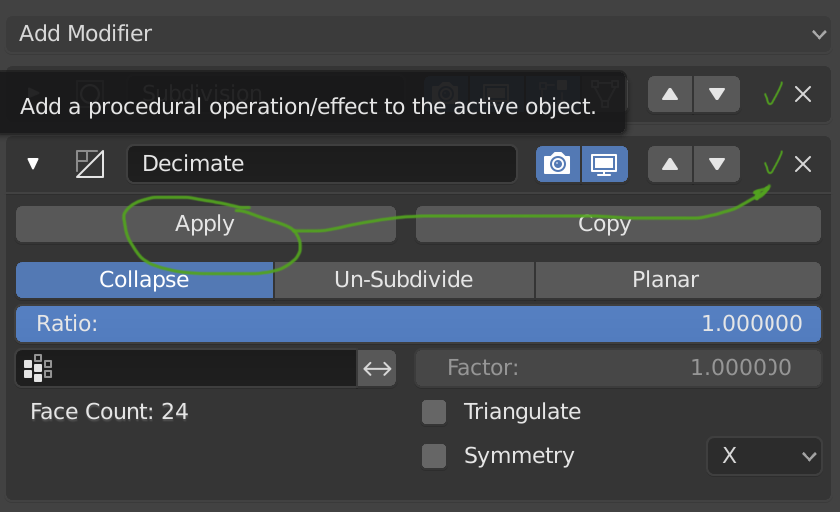
20 Comments
I would prefer Ctrl+A->Apply selected modifiers. The same way as i can copy them with modifier tool.
Anybody skillede enough to modify addon? {attachment 170337jpg}
+1
I would also like to be able to rightclick the modifier from the modifer list and have some contextual menu, indluding some actions like "apply selected", "apply all", ...
* @-L0Lock- * yes, good too
* @ Vyacheslav * Convert to Mesh applies all modifiers, not sure if this is what you want. But this would be easy to extend into your idea, with a Python script that hides/unhides modifiers before issuing the convert to mesh command.
* @Josephbburg * Thanks. For meshes it is exactly what I need. But applying one by one can do another result without rearranging stack of modifiers at first.
Also if i have a lot of modifiers, i should hide a lot to apply 2-3 and then unhide. Not so handy, isn`t it?
* @ Vyacheslav * I think the biggest strength with your proposal is that it can apply multiple modifiers at once. Currently blender only gives the user the option to either apply one or apply all. Your option would nicely fit between the extremes.
* @-L0Lock- * Apply duplicate to update the uvmap for shrinkwrapped mesh for example without getting rid of the modifier, move to top, move to bottom, apply all after this, apply all before this, select vertices from the vert group from this modifier, replace vertex group with current selection, collapse all, uncollapse all, go to top, go to bottom...
* @ Vyacheslav * That's where Python comes in. It'd be possible to write an addon that produces a list of modifiers to apply, and hides/unhides them before running the command, and them resets their visibility. This is probably a simple enough task to be a first addon.
* @Josephbburg * as i said, this task for addon, not for core-developers.
I'm not so sure. I'd be worried about accidentally applying modifiers when trying to reorder them.
* @Jason van Gumster * yeah, me no like. And the modifiers addon has a bunch of tools for quicker collapse of modifiers, if one need that at some point.
* @Jason van Gumster * I mean if you are worried about applying them accidentally are you also worried you might delete a modifier accidentally with the existing X buttons? Personally I'd love to have a duplicate button there as well.
* @o7216059 * Yes, actually. I've definitely deleted modifiers on accident. Quite annoying.
* @Jason van Gumster * Would you say the issue is the positioning of the buttons or the way blender does those actions without clearly notifying the user? Becasue to me I'd love to have more buttons but at the same I'd like clear indicators from blender if I accidentally do an operation so I can't miss it.
* @Jason van Gumster * So just to be clear, is the proximity between buttons what concerns you, not its existence on header?
I would say both the existence and proximity of those buttons is an open door to mistakes, with more or less consequences. Which could be avoidable through right click menus.
* @jordi torres * Proximity is my biggest issue. But clutter comes a close second. Not every operation can or should be a "first class citizen." I understand the value of quick access, but the value of quick access is mostly when you have a bunch of modifiers you want to apply (either a bunch on one object or the same modifier on a bunch of objects). If that's the case, then maybe there's a better solution for that problem than adding more buttons that could be accidentally hit in every other case.
Maybe here?
where ?
....