maybe because the icons are a certain standard, it may be easier to use.
sample
25%
Development Status:
Open
Upvote1Downvote3
t
temp
23 Jul 2018
5 Comments
v
valentinwn
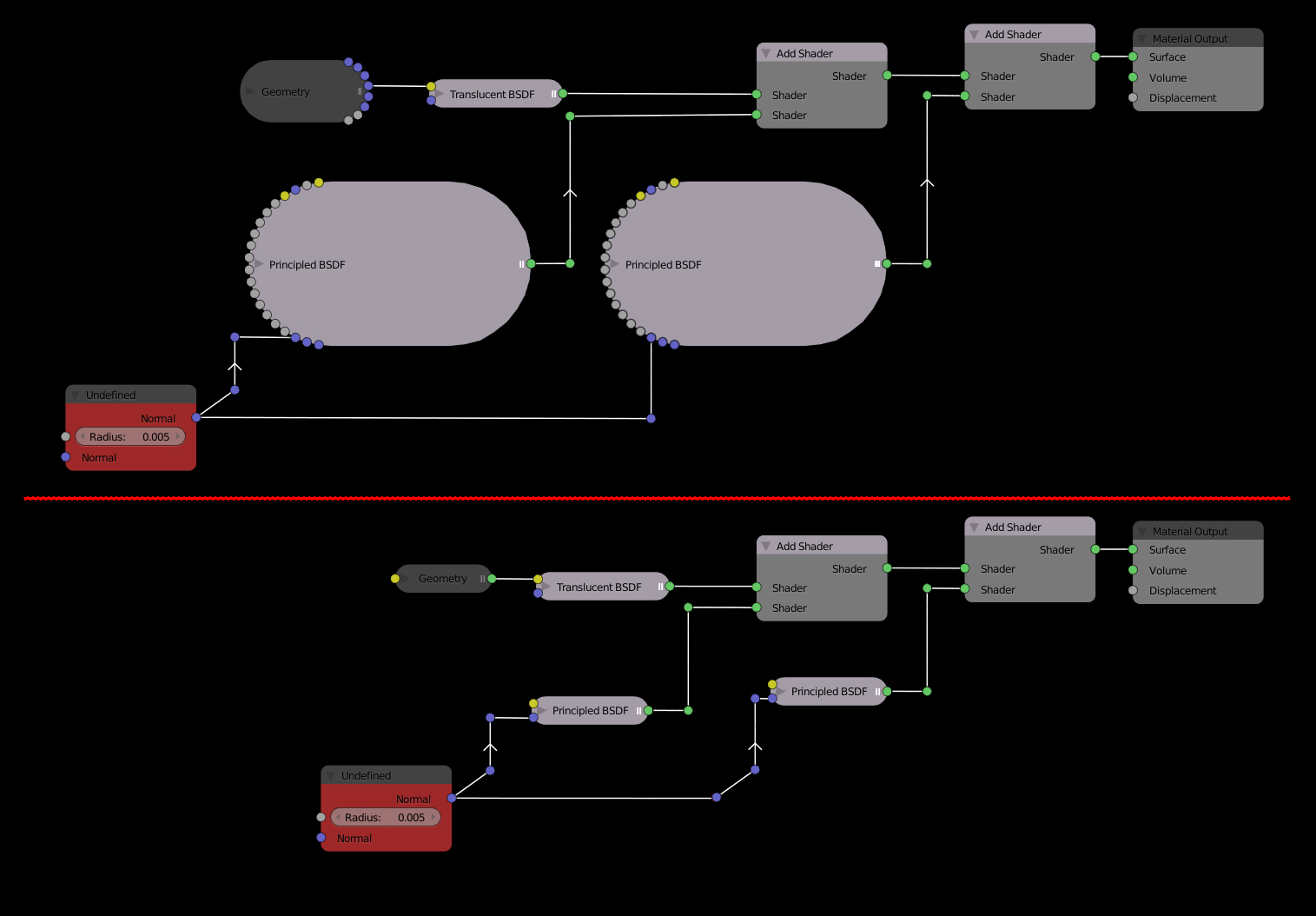
LOL I had a good laugh with this problem. Indeed I had never noticed that with the new Principled BSDF shader when it is "reduced", it is even bigger than before and looks like a big potato. .. I suggest that unused entries not be visible in reduced mode. Otherwise, it loses its usefulness. Not to mention it must necessarily enlarge to know the name of the entries displayed.
Sorry for translation...
M
MickHanks
I love what is see but don't understand the text of your post. I've wanted a Circut stile noodle option in node UI's for years. The arrow flow is a nice touch.
s
simonstoschu
You can hide all unused Inputs of a Node with
Ctrl
+
H
edit: sry didn't mean to reply to you but to the OP
M
MickHanks
@Simon Storl-Schulke:
Thanks for the tip, Not a fan of colapsing nodes.
L
Lauloque
So you want that the unused inputs/outputs are by default hidden hen the node gest collapsed?

5 Comments
LOL I had a good laugh with this problem. Indeed I had never noticed that with the new Principled BSDF shader when it is "reduced", it is even bigger than before and looks like a big potato. .. I suggest that unused entries not be visible in reduced mode. Otherwise, it loses its usefulness. Not to mention it must necessarily enlarge to know the name of the entries displayed. Sorry for translation...
I love what is see but don't understand the text of your post. I've wanted a Circut stile noodle option in node UI's for years. The arrow flow is a nice touch.
You can hide all unused Inputs of a Node with
Ctrl+Hedit: sry didn't mean to reply to you but to the OP
@Simon Storl-Schulke: Thanks for the tip, Not a fan of colapsing nodes.
So you want that the unused inputs/outputs are by default hidden hen the node gest collapsed?