
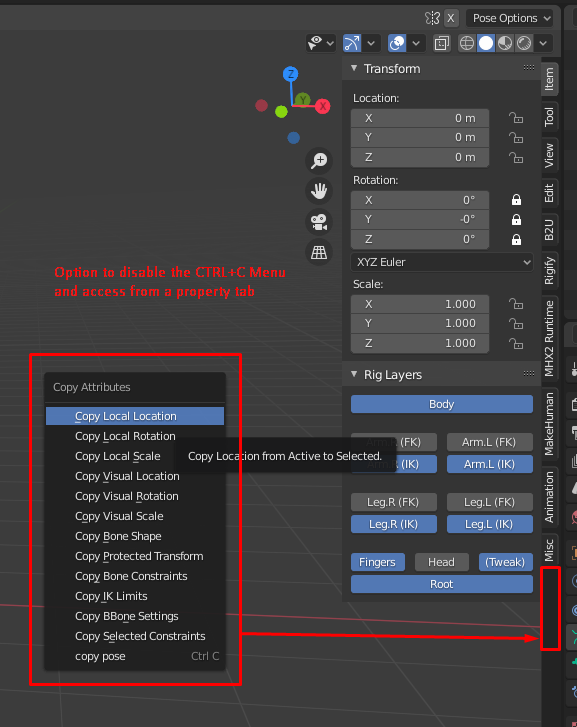
'Copy Attibutes Menu' Addon is Amazing, but the Ctrl+C hotkey overwrite is kinda bummer for the workflow
For me, this is one of the best and iconic addon Blender has. It is so damn useful! The problem is it takes the Ctrl+C hotkey, used more for other stuff, like when posing a character, etc. So I have to keep enabling and disabling this addon quite often. I know there still is an option there to copy the pose to keep it accessible, but still one unwanted step.
So, I would like to ask to add the possibility to enable/disable the hotkey overwrite in the Addon options and let this menu appears as a Tab in the property panel to keep the fast and easy access.
Thanks anyway for this amazing old school addon, Bassam!
6 Comments
I pushed it to Ctrl+Alt+C as alternate command.
But what I really would like to see in this awesome addon is possibility of copying attrs to buffer.
For example, I have parent attribute for upper arm to change "world/pelvis/chest/shoulder" inheritance. I need copy world matrix, change parenting, paste matrix to keep it on place. Ctrl+C is works only for local transformations and attribute copying is for copying from active. The "fastest" way now is to copy-transform constraint on empty before changing parent, then killing the influence to store keys and then deleting constraint... Not cool.
* @sickmonkeydub * me as well. Should be the default.
On my phone right now so i can't check, but isn't it in the viewport's edit menu as well?
Imho the addon should use another shortcut in the first place, like ctrl shift c or ctrl alt c.
You can add an entire submenu to the quick favourites. If this Copy Attributes menu appears somewhere in the main menu system you could maybe disable all of its keyboard shortcuts and just use it from Q
hmmm, maybe we can add it in a viewport menu instead? property tab seems a bit hidden, what do you think?
Hey * @Bassam Kurdali *, how is it going? I don't think it is so hidden, because if I need to use it often or repeatedly for a task I rather let it opened there than open menu for each time. I my humble opinion, it could live in all 3 areas: Ctrl+C hotkey, Viewport Menu and Edit tab from Properties Panel, but being able to enable/disable each one of them in the add-on option as a checkbox, for example. And I think the Edit tab is the perfect place to this, because it make sense to be there, It is a kind of empty tab either, but we can contract and expand as needed if it get crowded and it doesn't need an exclusive tab since there isn't too much content and there are a lot add-ons doing it, so when you enable all of them the tabs get smaller, being hard to identify them. BTW, I'm talking about the viewport property panel, not the Property editor window.
If you implement it and need someone to test it I'll be glad to find someone to help on it. JK, I will be glad to help and test it. This is in my top 3 addon for Blender.
Cheers.