
Properties Editor: clickable breadcrumbs
The nice breadcrumbs bar at the top of the properties editor could profit from being a functional navigation widget. I like it very much, (only the display could be more compact).
My idea is to make the "entries" clickable and perform according actions, like a switch of the displayed tab.
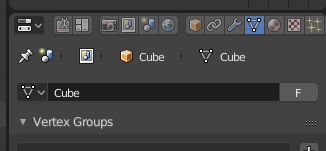
An example: If you select the default cube and switch to edit mode, then display mesh properties, it looks like this: (sorry, don't know how to upload images here, so in text form)
(pinicon) | (sceneicon) > (viewlayericon) > (objecticon) Cube > (meshicon) Cube
For example,
- clicking on the object icon (or text), would open the object tab in properties editor (and alternatively set the object to object mode),
- clicking on the view layer icon opens the view layer tab
- etc.
To help the user with this, some descriptive tooltips or status bar / info editor items could be also helpful.
What do you think?
Cheers, Michael
2 Comments
in generating would be desirable to re-search for a better rearrangement of the icons ... it is too long .... it derives from a long time ago when the property window was horizontal and it made sense to have many icons lined up for a certain length, but now every time it's annoying because you are forced to enlarge the property window to see all the available tabs
For images & other use " markdown cheatsheet "