
Importing Assets is a Consistently Poor Experience
Drag a .blend file into the 3D Viewport and you'll get a little pop-up dialogue asking if you want to Open, Link, or Append the file. Choosing Link or Append will open the file browser - in the correct location - where you can be more specific about the what and how.
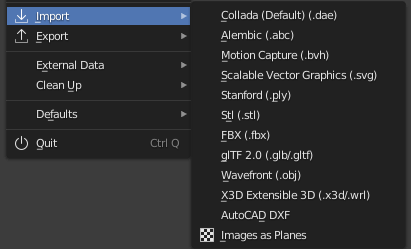
Drag an FBX or and OBJ or an STL into the viewport and nothing will happen. Then we need to Import it from the File-Import menu, but we're immediately hit with a list of format options. We then use our system file explorer to navigate to the asset in our library to check the file format. Go back to Blender, pick the format from the list, navigate from the default folder to the asset in question (again) and finally we can Import it. Having navigated to it twice.
This process doesn't make a lot of sense to me, and over the course of a whole scene with 100-200 imported assets, I'm losing a not insignificant amount of time.
My suggestion would be to, first, make the file browser able to recognize files by their suffix and display the contextual import/export options depending on that suffix. Second, to make dragging an asset into the viewport open up a File Browser in the correct location to show the import options. Alternatively, dragging a file into the viewport could invoke a dialogue that lets you choose between Quick Import - that imports with automatic settings - or Options - which could take you to the File Browser to be able to change the import settings.
An additional nice feature would be to be able to open 3rd party formats from the Open option where Blender would just make a new file and import the asset directly.
4 Comments
Some day... developer.blender.org/T68935
Oh yes, please. Is the modular design of having a separate importer add-on for each format an obstacle towards having an all-in-1 Open/Import -dialog / drag&drop function?
* @snieb * It shouldn't be. It's trivial to read a file extension and then call the correct importer.
AGREEE...