
Parameters for snapping increments
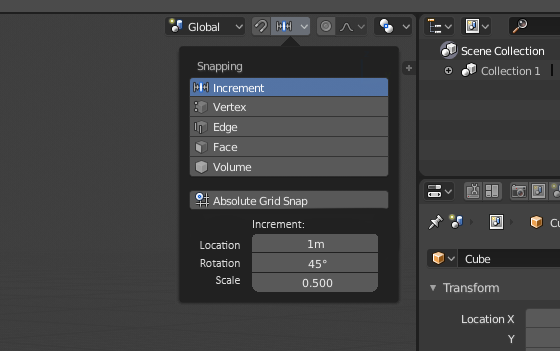
There should be 3 parameters to tweak the loc/rot and scale snapping increments under the snapping menu. Right now the whole thing is kind of a mess.
If I want to move something with snapping, it snaps to every 1 unit. If I want to change that, I can change the visual grid floor scale. This is only for moving though. Rotation snaps to 5 degree increments and scale to 0.1 increments. Those values are hard-coded and not changeable anywhere (Except when you press shift rot goes to 1 and scale to 0.01 increments, not very useful in most cases). For example if I want to rotate something by 90 degrees I need to fiddle with my mouse to get the exact 90 degrees and not 95. Same goes for scaling.
Why don’t I just do R-Z-90 manoeuvre then? IMO that’s slower than what you could potentially get with proper snapping. Especially typing in the numbers, you either have to take your right hand off the mouse or try to reach for the keys with your left hand. Also, it’s always a mess checking which way is positive and negative, I often have to do it twice because I didn’t press -. To add to that problem, when you want to rotate clockwise, you have to press minus and anti-clockwise you don’t. Pretty sure it should be the opposite way around.
15 Comments
I up vote anything related to improving snapping. Good idea.
The absolute negative / positive direction in moving / rotating while doing transformation operations is nonsense. It is just too slow and prone to errors, we are constantly rotating our point of view and often do not know / care which direction is positive. This is especially true for the rotation, which even has one logic in ortho mode and a different one in 3D. I get frustrated every time. Often i have to redo the operation because my move command was in negative direction. I just don't have the time to check every time the headers if i am going in the positive / negative direction. It just does not matter!
Sorry if i am too harsh with my words again, but coming from a standard app behaviour world and having to fight with blender for 6 years now, MOVE THE FREAKING THING IN THE WAY I STARTED TO MOVE IT WITH MY MOUSE IN THE DISTANCE I TYPED!
:)
@Okavango: Not a bad idea
@Okavango: That, my friend, is a great idea. Make the + or - relative to the direction you started dragging in.
@dpdpforlife: Exactly!
@Okavango: Man i should really chill a bit :)
And for what it’s worth, currently in 2.79 (and probably 2.8) you can type the “-“ minus sign at any time when typing in values. So you have the options of
“-90”, “90-“, or even “9-0”
There’s no need to start the operation over. The minus key works like a toggle instead of a character. So you can toggle from a positive to a negative value at any time. So I guess “- 9 - 0- - -“ would also result in a rotation of -90 degrees.
I won’t go into too much detail, and someone can correct me if I’m wrong, but I believe the counterclockwise rotation is the result of the z up/-y forward coordinate system that Blender uses. If you want to read more about this behavior of vector math look up “right hand coordinates” and the “right hand rule”.
If you hold your right hand out in front of you like you’re going to shake someone’s hand with your thumb pointing upward and then curl your fingers in to make a “thumbs-up,” you will see that your fingers are curling counter-clockwise around your thumb.
In other words either all of vector math will have to be reinvented or Blender will have to adopt a left hand coordinate system to have clockwise as positive.
@dpdpforlife: Good to now, nice insight. This left me wondering though, UE4 has a Z-up system, but clockwise still counts as positive Edit: UE4 and other game engines are left handed
Another possibility, either as a separate implementation or in addition to this one, would be to let the Move, Rotate and Scale tools (in the toolbar) have custom snap settings. That way, if the user wants to rotate objects with 22.5 degree snapping, they could use the Rotate tool for that, and the rotate hotkeys for the rotations that don't use that snapping. That'd make it easy for new users to find custom snap options, and would give experienced users a reason to use those tools for something even though they already know the hotkeys. It's not as clean as the suggestion here, but again, it might be something to consider in addition to custom snap definitions.
I like the idea of all visual options. Shortcuts are good, but why not have visual representations for them? Good idea. You have my vote.
projects.blender.org/blender/blender/pulls/118760
I got the rotation snapping increments implemented and added to the main branch.
please add this feature
yes, any kind of snapping improvement is welcome!
The grid snap setting should be a bit more precise/complete, ie: {attachment grid_sizepng} Grid Size - Main grid size Major Lines - How lines above/below the grid size are generated Min. Size - Smallest possible grid size (not necessarily attainable from Grid Size / Major Lines)
I was debating a Minor Lines option (ie. lines smaller than Grid Size) but I'm not sure if that's 100% necessary.
Yes, we need this. Thanks for letting me know.