
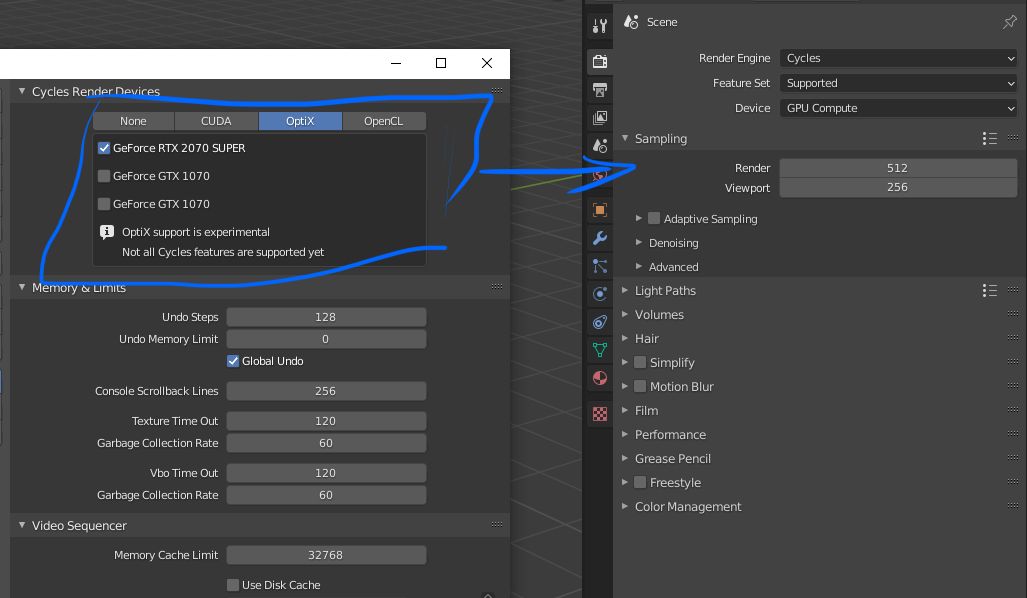
Select render device directly in render settings.
I'm sure this one will help many users with multi GPU systems and it should be easy to do. Useful when users using primary GPU for work and other ones for rendering at the same time. Always go to properties to check which GPUs are selected is not very comfortable. EDIT: save this setting globally and per project will be nice as well.
8 Comments
It also would help with render-farms. We are using Deadline and you need to actively start Blender on every remote client one time to set the system render device(s) manually. Then on every Blender sub-version change again (2.91 -> 2.92) which eats a lot of maintenance time. If you could force Optix per file in the Cycles settings with fallback to CUDA to CPU this would help a lot.
Completely agree with you! Great idea, hope we will see it in blender!
200% !
yes! Love it!
Disagree, because, It is a 'system' setting, like the theme, and shouldnt be exposed for changing it everydays. But maybe when having multiple cards with different memories, it would help. It is my opinion.
* @Kdaf * This setting is only for Cycles. have nothing to do with viewport or EEVEE or anything else. Cycles is like an addon. You can turn it off in addons list and it disappears. Also, you can install LuxCore or Radeon Pro Render. Both have device setting on the right place - under the render settings. So I think this is possible for Cycles as well.
* @shubol * Ok, understand, so, not that bad idea... Let see what the developers will think
* @Kdaf * And even if it was a "system"setting, why a system setting that might be changed several times a day should remain hidden away? User Interface should serve the User Experience, not the other way around.