
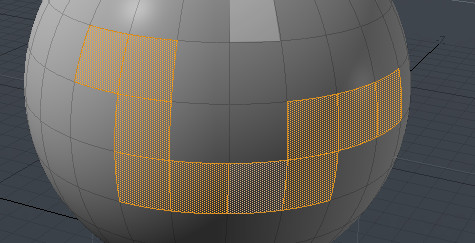
selection highlighting before clicking
this feature there is in all of famous 3d software like maya; max; Rhino; zbrush when you want select face or vertex or edge highlighting before selecting why not in blender? you can selection faster and easier face; edge or vertex in complex scene
30 Comments
Only as an optional feature please. I suspect such " live " calculation drop down fps especially in heavy mesh.
* @forestgumpovu4 * Fast preselection highlighting was not practical in 2.7 with old opengl, but should be possible in 2.8 with small performance cost. it will take some extra gpu ram.
The main tradeoff is that it can only be used when a selection-buffer is sufficient.. and care would need to be taken in situations with multiple selection elements under the cursor.
This is how it could work…
Edit mode drawing would have a selection ID buffer as an additional output target during all rendering. This would be smaller than the full 3d view, but it would take vram.
The simplest version is just a single selection-id per pixel. Though more complex schemes could create different tradeoffs of memory requirements and maximum selection-ids per pixel. If there are more selection-ids than fit in a pixel, there could be an "overflow" bit that would allow the UI to display or handle selection highlighting over that pixel differently.
When moving the mouse, the full 3d viewport would NOT be re-rendered, as this would be slow. Instead the selection-id buffer would be queried, and a highlight would be rendered as a 2d overlay, and temporarily composited on top, like the overlay gismos, so it could be quickly changed every frame by just rendering that single primitive and re-compositing the overlay.
The cost of this method is… slightly more vram usage for the selection id buffer to always be used, a potentially larger overlay composite buffer (i don’t know if the current overlay buffer is as large as the viewport or just as big as the gismo area). A bit slower drawing always (but probably only a tiny bit), because fillrate is spent on the selection id buffer, and because of a few extra shader instructions to write an additional output target.
* @David Jeske * I say nothing against. I vote up. But I asked for " optional ". Another reason to turn it off is " dancing highlights " everytime & everyvhere. Most of time I known exactly what I get from selection and I don't need for all this bells and whistles dancing on my model and make my eyes tired.
It's like 3D Max highlight object when cursor on it. Such feature in complex scene just convert viewport to blinking discotheque. Firs " New " feature to turn OFF and newer come back to it.
* @forestgumpovu4 * I have a preselection addon I wrote and there's no noticeable performance hit. We use it regularly at my studio on meshes up to around 250k verts- at that point there's much more lag just doing basic modeling operations.
edit: and yeah, I agree- it should be optional, but only because people have different tastes, not because of performance.
* @testure * Does your addon work in 2.8 and could you share it in the meantime? I've found a couple that other people wrote for 2.7 but they're not compatible with the API changes in 2.8 and it's beyond my skill level to do all this raycasting and GPU batching.
* @Chris Kohl * yes, honestly preselection works better in 2.8 because the viewport renderer is no longer fixed function. The GPU calls for preselection add virtually no overhead, but there is a slight perf hit (as an addon) because you need to maintain a kdtree, which would not be necessary as native functionality because the raw data is always accessible (where it has to be reconstructed in python).
But again, that has nothing to do with the GPU- that's all CPU stuff. There are other edge cases that have to be handled in python that wouldn't be necessary in native code (such as scene.ray_cast hitting objects not visible in local view, or bvhtree.ray_cast hitting faces that are hidden), but it all works. it would just work better as a native implementation.
Regarding sharing it- unfortunately it is too tangled into my studio's custom pipeline stuff to share. One of these days I might port it into a standalone addon but I won't have time for that anytime soon.
* @testure * Nice to hear that it is atleast possible.
+1, also for proportional editing size/falloff please.
i don't suspect that's coming anytime soon. wiki.blender.org/wiki/Reference/AntiFeatures
* @floe * Which is very unfortunate. There is no way you can tell what depth your cursor is in. The cursor is in a 2D space in the screen, not 3D. There is no depth feedback to help you select. You have to ALT+Select to understand what you are selecting sometimes, and even with the system Ton talked about, practically in day to day work (over years) has proven erroneous. Even if it's Select>Operator workflows, you still need a system to help you Select in the first place.
* @Andres Stephens - Trinumedia * not argueing the usefulness of preselection highlighting at all, quite the contrary. would love to see it in blender!
Well, that "anti-feature" references a 7 year old post, maybe it's time to revise it and consider it again. I think this feature would fit in nicely with all the new cool stuff in 2.8. Besides, it looks like something similar was already implemented back in 2.4.
* @floe * i would not read too much into this anti-feature entry.. this is an argument against operate->select, vs blender's select->operate model. There is nothing about pre-selection highlighting that is incompatible with select->operate.
Also, back when it was written, blender was using old opengl, in which doing pre-selection highlighting would have had large performance impact.
* @David Jeske * pretty much this. preselection will come eventually, I'd bet money on it. especially with a large influx of new users (and more dev fund money from those users) who are coming from other apps and expect it as basic functionality.
* @David Jeske * well now we have Active tools which break select->operate paradigm completely so there is no use of that argument here anymore.
This would be particularly useful in wireframe and x-ray mode when you have the possibility of selectng through the mesh and have to contend with face dot selection and non-obvious cursor depth.
for example selection highlighting, this function is already implemented in paid adons.
youtu.be/KtRHctLxy0Y
And nothing blinks.
And how it can be "AntiFeatures" i do not know.
Everything works fine. as you can see in the video youtu.be/KtRHctLxy0Y
So these are just the usual excuses from developers blender
Crazy that we need to go all the way to something as cumbersome as UV mapping before people acknowledge that "oh, it might be nice to know what I'll be clicking, or else this can get kinda hairy."
A cool thing in Maya was that you could already modify the preselection, for example hitting delete would remove it even before actually selecting it.
OH GOD YES PLEASE. This saves so much time and so many clicks. I have found myself in Blender, click, click again, click again, just to get the right selection. Even trueSpace from 2009 had this, pre-highlight on all geometry AND objects (and it could be toggled on/off). This is such a necessary workflow.
So let me get this straight. This very fundamental and useful feature that you expect if you have used any other 3d program ever, is not available in Blender, even though people have been asking for it for 6+ years?
Indeed. First suggestions for this are from all the way back in 2018 where the explanations for it's absence were as silly as they are here.
Does anyone know if there's an addon that enables this?
Been searching for four years. No cigar. BetterBlender seems to have had a 2.76-compliant PY-script available that would enable preselection highlight for faces. But. Yeah. That's a while ago.
It has been almost 1 year. Still waiting for this to happen.
Such an important feature this is.
OH YES!!!
Have you tried the addons "Smart Select" and "Smart Fill"?
Nice of you to suggest this, but it doesn't do mouse-over highlighting.
So.
We're coming up on 18 years of this being a fundamental feature in Maya. Particularly for animators, who really enjoy knowing which controller they will be grabbing, before they actually click it. No overhead or slowdown from this process in 2008.
It was such a game changer back then, to always be sure which component or curve you would be selecting and deselecting, that it is incredibly tiresome to watch Blender natives continuously brush it off, year after year. As just being a little something for la-dee-da crybabies with their pinkies in the air. It really does make a massive difference in everyday comfort when using the software for hours on end.
Computers are now several thousand times faster than they were in 2008. Overhead simply cannot be the reason that Blender doesn't yet do this. Not even if a secondary overlay had to be rendered. This simply has to come down to blender natives not having experienced how nice a feature it is.
This is literally among the reasons for blender not being an industry standard.
Learning Blender these days and I'm a bit dismayed to find that this feature isn't yet in place. If the software is supposed to be approachable for hobbyists and professionals alike, I don't think it should have to do without preselection highlights for much longer.