
A way to access Shared Enum Items
Shared Enum Items are enums that are used internally by python for built-in operators and menus.
For example, the list of object modes is an enum. It contains the name, description and icon for all the modes. It's used to created menus like this one:
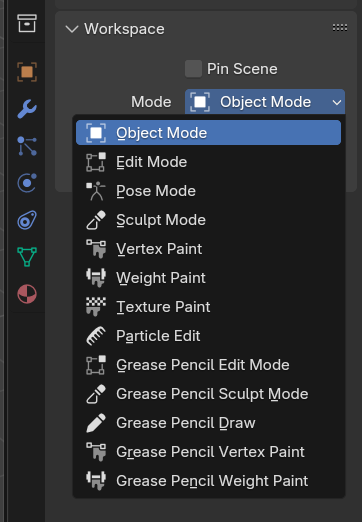
There is currently no way to access these enums with user-made python scripts or addons.
Practical example of how access could be useful:
Let's say I want to make an operator that removes a certain object type from the selected items. Pretty easy, but I'll need an enum with all the object types. Would be great if the enum had icons assigned too, to make the dropdown in the operator panel look nice.
I could write the enum myself, but why re-invent the wheel? So I check another operator that has a dropdown with object types that I could re-use, like bpy.ops.object.select_by_type :
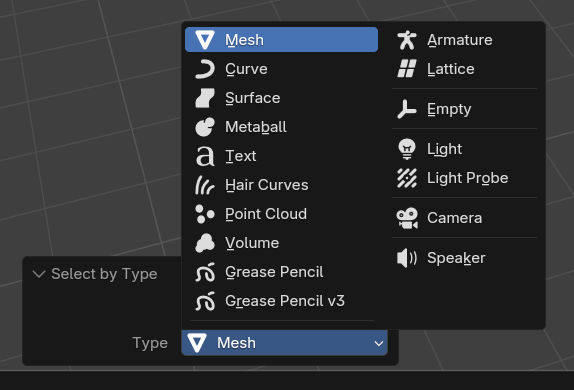
The documentation even links to the enum that has all the object types , and that will have all the names, descriptions, icons, all properly assigned, so it would be great if I could re-use it... but there is no way to access that, or anything else in the Shared Enum Items list.
Like I said, I can make my own enum, but that will take time, and might potentially break if a new object type is introduced. So having access the the shared enums would great.
1 Comment
Sorry, I don't normally use Python, but aren't they all there? Object modes at bpy.types.WorkSpace.bl_rna.properties['object_mode'].enum_items and object types at bpy.types.Object.bl_rna.properties['type'].enum_items. I can see all the object types listed with bpy.types.Object.bl_rna.properties['type'].enum_items.values(). And I can find the icon used for Speaker with bpy.types.Object.bl_rna.properties['type'].enum_items['SPEAKER'].icon. Or am I missing something?