
Properties Editor Display Modes
There are more and more properties added to Properties Editor.
A filter was added to retrieve them. Its goal is discoverability.
But when properties places are known : there are other needs like a way to display related properties. Subpanels have been created to group some old panels into newer, bigger ones. Counterpart is that order of subpanels is fixed. When user wants to ignore some properties, he can close a panel. Label of this closed panel stays visible. If there are a lot of panels to close, user will reorder the panels to set on top of view open panels. User can close all panels except one with solo mode.
To sum-up , there is no great fast solution for when user want to see open 2 or 3 panels of a Properties Tab. He is forced to click a lot, to scroll a lot or to take time to reorder panels.
So, here, comes my proposal to add Properties Editor Display modes.
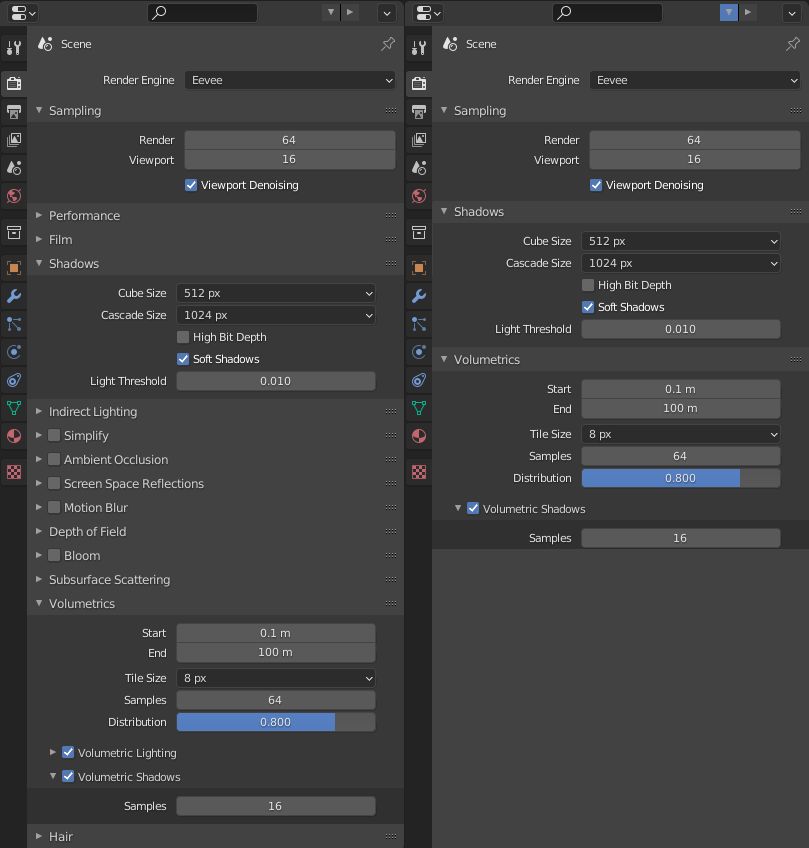
By default, behavior is identical to current situation. But by pressing a button in header or Z key, all closed panels are hidden. That way, user doesn't have to reorder panels to avoid scrolling.
All properties, user wants to access are next to each other.
- By pressing Z key, again, behavior goes back to normal.
- By pressing Shift Z, behavior would be the opposite. Only closed panels are visible allowing user to open more closed panels.
- By pressing shift Z, again, behavior goes back to previous mode.
So, behavior would be similar as in 3D View, when user switches from Solid display mode to Wireframe display mode.
This is more versatile than solo mode that only displays one panel at a time.
0 Comments