
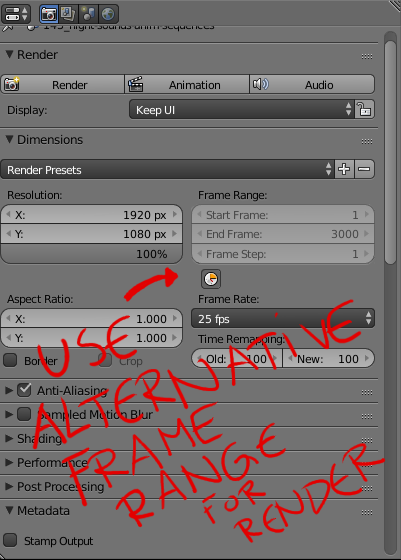
Alternative frame range for rendering
I often render a portion of the timeline, rerendering a few frames here and a few frames there. It's always a bother to remember the proper frame range for the scene and remember to change back to this after I've rendered the small portion.
I would very much like to be able to use the alternative frame range for rendering with a toggle selection for this.
edit: As suggested in an answer below it might be better to have the alternative range to simply be an alternative render range instead of only an alternative playback range. Thus removing the need for an extra UI button.
6 Comments
CTRL+B is used in the 3dview to specify a reduced render region. What about being able to CTRL+B inside the timeline to specify the reduced timeline render region. CTRL+ALT+B to clear the reduced timeline region.
FWIW, you can already set arbitrary frame ranges if you render from the command line. And, to be frank, that's the best way to render anyway... especially if you've completed work on your scene (and it's faster, too).
Of course, there are other options. For quick re-rendering of some frames, I sometimes change my frame range and render without saving. Then re-opening file preserves my original frame range. If I do happen to make the mistake of saving in that case, then Blender's auto versioning helps. Just open the
.blend1file that has everything before saving the temporary frame range. Then save that back over your.blendand you're good to go.That said, it'd probably be nice to have something in Blender's UI for this. I'd just prefer the UI to be something cleaner than what's shown in your mock-up.
Yes, I do this as well, but it is more convenient to press a button in blender than to open terminal and type your render line.
With ChameleonScales suggestion to have the playback range automatically override render settings there's no change in the UI. Completely clutter free. :)
Is it even possible to render the preview range ?
I initially was looking for this but found the Preview range which also renders that range if you select the render option from the View menu. I'm guessing this is still open because we still want to render the preview range with F12 ?
YES ! That's exactly what I'm looking for :)