
View layer improvements
So coming from Maya I really miss their render layers. Of course Blender got view layers but they are very limited compared to Mayas, so I have a few suggestions that I think would help :)
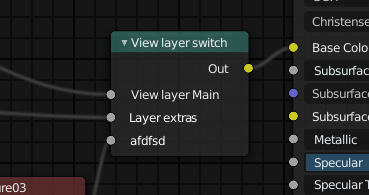
- A material render layer input switch node. Don't think Maya have this, but I feel that this would be a very simple thing to implement but still a very powerful one. For me it would actually make the "material override" suggestion further down kinda obsolete (but it should still be implemented imo).
Would basically be a shader node with one input per whatever view layers you have in your scene with the same name etc, and one output. So if you select view layer A it would use that input, and if you select B it would use that input instead. The node should accept whatever type input possible. Linking an image as an example: i.imgur.com/eEKwYsN.png
- Right click ANY option to make layer override. Maya has this and this is really handy. For example being able to change amount of samples per layer, or maybe the roughness value or whatever of something would be nice.
Doing so on an option should make it a different color to show that it has an override, like a bold orange text as in Maya.
-
Per object visibilty. This already works on lights, but should work on objects as well. As it is now you have use collections for objects instead which is somewhat cumbersome. As above it would be nice if an object has an visibility override would also change color of the icon to indicate it.
-
Per object material override. As it is now the material override only works per layer which is very limited. I usually do stuff with a lot of foilage and displacements, so a material override that doesn't take into account all the different alphas and displacements isn't useful at all for me.
5 Comments
First: Please don't put multiple proposals into one pose.
A great idea that I often wish for.
In development, but a rather difficult problem to solve -- note that this link is for library overrides. Dynamic Overrides (which is what you're suggesting) that affect the data within a .blend file are not coming until Static Overrides are finished. So there will be a bit of a wait on this one.
I consider this a backwards way to work - just use collections. Nothing prevents you from having a visibility collection for each view-layer in addition to your other collections.
See #2
Please clip out and expand the first idea so I can vote for it! And feel free to do the same with the others. But it's best to only have one idea per post here (site rules).
* @Josephbburg * I kinda felt that this was one idea since it's all about the same thing, but yeah sure I can do that :)
About number three I can't get it to work that way. If I have objects in multiple collections and turn of visibility of one of the collection the item still shows if they are enabled in another collection. I have to turn of visibility on all collections they are present in to get them to disappear. Sure if would work the way you suggest then I'd be happy with it, but sadly it doesn't.
* @gwetell * Create a collection that has all of the objects being rendered in a view-layer, and then enable it for rendering and not for viewport. Then, organize your scene as you normally would, but enable those collections' visibility only for viewport and not for render . That should work. If you're coming from Maya, you might not know, but Blender tracks visibility separately for the viewport and Render.
* @Josephbburg * If I disable something for rendering or in the viewport in one view layer it will do the exact same in all the other view layers. I really can't get it to work in any manageable way. The only thing one can do per view layer is to disable the whole collection with the box to the left in the outliner. And if an object is in multiple collections it will show until you disable ALL of the collection the object is present in. Even the manual for view layer says it works that way. So I might miss something obvious but I really can't get it to work in any proper way at all and it really have to be fixed imo. Either by enabling per object visibility or by the collection way that you are suggesting.
* @gwetell *
{attachment exampleblend} <-- download me!
This isn't the effect you want? I don't think I understand what you're asking for. By doing exactly what I described above, I can have any arbitrary combination of viewport-visible objects and render-visible objects.
Yes, it works like this for individual objects -- you have to edit the viewport/render visibility of the collection . The checkbox is not what I'm referring to, I think it's just a quick way of setting render/viewport visibility together. Either way, the checkbox doesn't negate the technique I'm suggesting.
Now you will have to make a rendering_collection for each viewlayer this way, which I suppose is annoying but it's IMO much better than using overrides that can be scattered around in any collection on any object.