
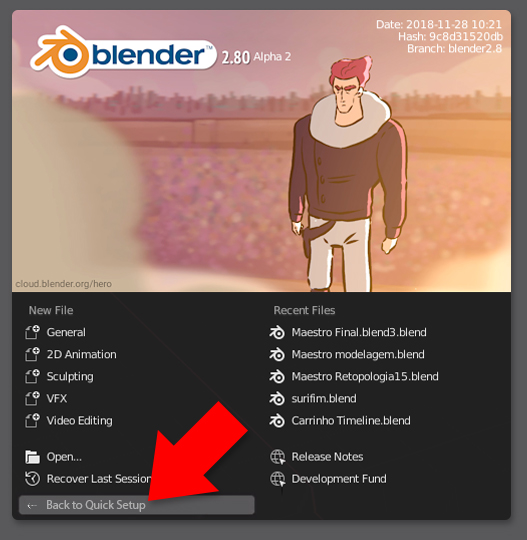
Back To Quick Setup Button.
Pablo just released a video in the Blender Developers youtube channel announcing that Left click will be default and that we will be able to set some basic preferences at a quick setup screen that appears before the Splash Screen. Once you close this Quick Setup Screen, the settings will be saved and the next time you load Blender you will get direct into the normal Splash Screen we are used to.
Just wondered if it might be a good idea to go back to this Quick Setup Screen somehow. Perhaps a button in the default splash screen.
I know that all the settings can be changed in the settings window. But perhaps this could help people review theses basic settings faster.
6 Comments
I actually mentioned this before . While I don't see myself using it, it may be helpful for newcomers and beginners. They may fear less committing if there is an easy way to go back
Not only for new users IMO. Even though it's easily accessible in the user prefs, the splash screen remains a place where users go at every startup without further clicking and will remember well (so, their intuition might ring a bell here).
The only thing I do with the splash screen is select a recent file. Blender opens with a new file anyway, and if you need a specific workspace you just click a tab. I would say the "new file" column could be replaced by the Quick Setup. I use a tablet so left/right click is all the same to me, but I do understand it from the point of view of a new user so maybe the choice could be a tad more prominent.
Those things are templates, not just ways to get into certain Workspaces.
Here just a link to the proposal/mockup I posted on the developer.blender.org thread - and that Duarte Ramos refers to..
developer.blender.org/T56510
yeah! I was thinking the same.