
Prevent Negative Scaling.
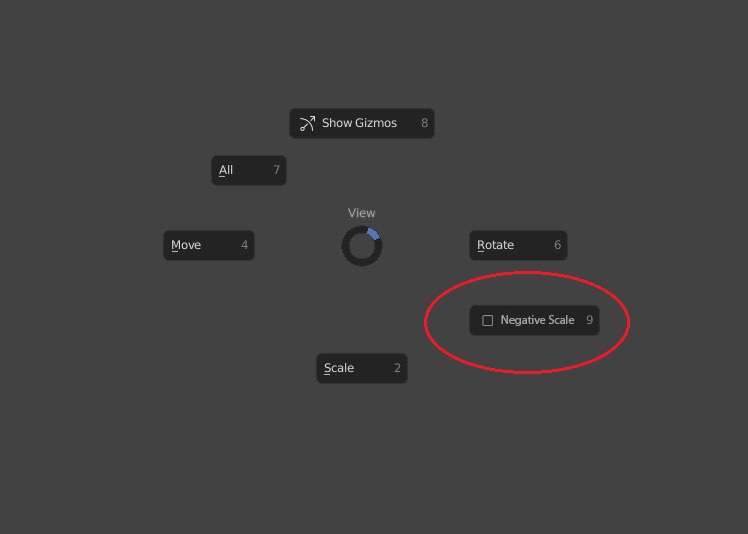
An option to scale tool/Operator to prevent scaling in negative direction it could be for Edit/Object modes or just edit mode similar to Maya. this is much faster than having to move you hand from the mouse to type '0' on the numpad and should be added to the 3d Gizmos pie menu too.

9 Comments
agree with option to turn that off. But its waste of position in pie menu. I was working with maya about 6 years, and I cant recall situation I needed negative scale. It just could be accessible in tool panel. Is not necessary have it close, and you avoid accidentali turn that on/off.
FFS why isn't this in Blender already... prevent negative scaling actually allows you to do quick thinigs like select a bunch of verts and scale so they are all aligned and thus create a flat 2nd plane....with Blender current shit negative scale tranform it's just fucking useless.. like you can't even get close to 0 before it flips over to -1 scaling... like it its been designed and tested by retards.
As far as I don't care of useless gizmo and use negative scales sometimes to flip something (so just static option in preferences is not solution), but to avoid in such handy way necessity to move hand to numpad for " 0 " value (too often move) - my request is hotkey toggle for operator.
Some
N(Negative, intuitive, not too far from left hand comfort zone). If in preferences enabled " 0 "scale cap and if you pressNwhile scaling - you can go below " 0 ", else you capped.Please add this feature! The lack off it is the one of the few reason i still use modo as a fast modelling tool instead of only use blender. Just a checkbox so you can turn it off if you don need it. But for me it is a nightmare constantly press 0 with my left hand on the other side of a keyboard
I was really surprised what such checkbox wasnt implemented to blender right from the start. Most convenient and classic way for most DCC.
Is this available on blender 3.2? How can i turn this on
Absolutely agree with it! Please add a checkbox for us.
Until then while you grabbing the gizmo before release it you can add the value on the fly just push the "0" button or 23 or 56 what you like. :) Not bad, but i really miss too the negative value checkbox
Use the cursor as pivot and scale to it. Easy and no extra cluttering needed ;)
* @grinsegold * I prefer using Active Element to pick which part to scale from but still you have to type 0 or go over the axis multiple times to get a flat side, but with this feature it is one click solution to speedup the process.