
Outliner View: Isolating Object Types
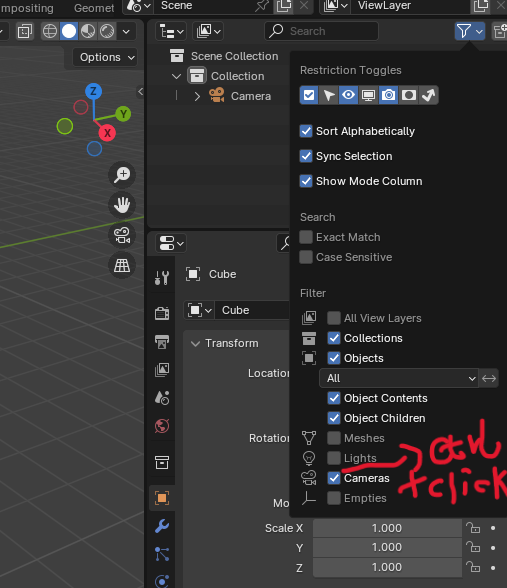
Hi everyone. Inspired by the images in a recent post, I’ve had a new idea regarding the Outliner. When searching for items, we often want to limit the scope to a specific category; a full-category search is usually too broad. For instance, if I’m looking for an image and the scene has a lot of objects, I’ll likely use the category filter to narrow the search down to just "Images." So, I’m wondering: could we have a feature where—perhaps by Ctrl-clicking—we automatically isolate everything
except
a specific type (like cameras, lights, or images)? In my opinion, switching between categories—isolating the desired type versus showing everything—is the most common use case for the search function, I’d really like this to be implemented smoothly. I hope it doesn't end up like the bone system, where you have to hunt down the isolated object type to disable the isolation before you can finally click "Show All"—that would make the "Show All" function feel pretty useless.having to perform multiple extra steps just to get back to the full view would be incredibly frustrating.
1 Comment
@imVictorian witek May I ask the reason for your downvote? I’d love to hear your insights—and I hope you didn't just drop a downvote without having actually used Blender for more than a few days.