
[animation, grease pencil] create a key by pushing the others
Hye everyone,
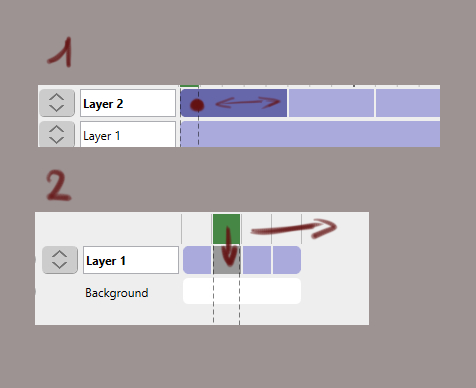
the idea would be for the grease pencil to be able to add two functionalities which is basic in the classic animation software. the first is to be able to increase the exposure of an image and the other is to be able to insert an animation key by pushing the one next to it.
Good day
6 Comments
If I understood, you are talking about the Extend option (in dope sheet> Frame> Transform) that allow you to move a group of keframes before or after a given time in the timeline. Accessible though E shortcut (you must have all the keyframes selected). I think blender will not change somethings so, your proposal is mostly an UI implementation and for that an addon creation is needed.
* @heyvictorcaballero * Up until now I couldn't see a difference between E for Extend and G for Grab, since the keyframes have to be pre-selected. Just realising now that simply pressing A to select everything then using E actually works based on where you are on the timeline (ie: doesn't affect the selected frames on the left of the playhead). Mighty useful! Probably wouldn't have bothered writing an addon if I'd known that before.
* @jack.herbert * Good for you! I think this is not the behavior you wanted, but the E shortcut handles some of the requirements described above. On the other hand, it is great that you have put your effort into creating an addon. That is not a waste of time because in the end you get experience, more knowledge and you become a power user. Remarcable.
* @heyvictorcaballero * No, I'm talking about keyframes moving straight without needing to be selected from the moment you create a key in the timeline at a given location.
* @loom378 *I have 3 ways to achieve what you are looking for but none exactly as you wanted. There it goes. In all cases, if you move the keyframes of layer 1 using the shortcut E you will make room for:
In the meanwhile, I hope it helps you a little.
I support this, as it is super practical and normal to have in any 2D animation software.
To be fair to Blender, it has a very different paradigm and greasepencil was tacked onto it, so it might take a while to get those basic functionalities.
In the meantime, I just wrote a very simple addon that eases a bit the process, see what you think: github.com/bergamote/greaspencil_nudge_frames