
Rotopaint equivalent in Blender *** directly paint masks in compositor!
The only thing I REALLY miss from Blender's compositor (apart from improving the display performance significantly) is the ability to directly paint masks on the composite result. Basically the lack of this function is a dealbreaker for me, I could use Blender for the whole pipeline if this was built-in.
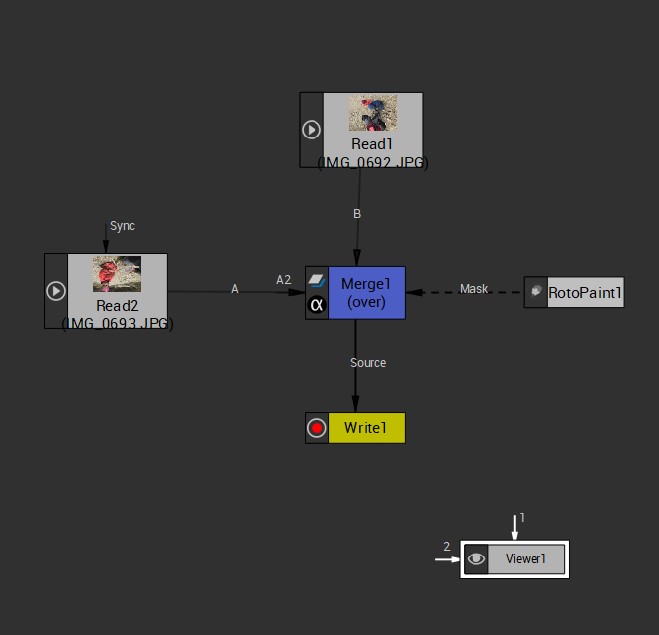
Natron/Fusion/Nuke all have this ability with the Rotopaint node (see reference image).
Why I need this? In architectural visualisation there are tons of occasions when a rendered building is to be inserted into a photo background. I can use vector masks for larger areas, but in about 70-80% of the area a much finer level of detail is needed. I can achieve this in about 10-15 minutes with a brush, whilst it would take me hours to create hundreds of little vector mask layers. Every brush stroke would need to be a separate vector mask with its distinct feathering etc.
As a workaround, currently I can create a new texture in Blender, save it, use it as a mask for the Mix node and in one window paint, in the other see the results of the composite output but it is "painting in the dark".
If this could be done DIRECTLY in the composite result window that would be a dream come true.
I guess the Grease Pencil could also be utilised for this purpose.
What do you think?
8 Comments
Yeah, and I'd want the ability to actually paint on the footage and sample itself with time offsets or whatever. To do clean plating.
* @corvore * exactly! paint on the actual footage
Slightly doubting if it inst possible, (we can overlay images and do some math on it), overall though thats a lot of manual work, and then one still has to make a mask image, where on preferably would like to see it live (while painting).
upvoted
* @peter.boos * yes. Paint has to behave like vector masks, whereas you wouldn't need to save the mask BW image separately but the file itself contained these paint masks in layers. Natron/nuke/fusion behaves this way, they all just store vector data of the painting plus some brush size and feathering info.
This would be great, especially considering Blender is now the only open source node compositor that's still active (RIP Natron).
Unfortunately even then it's not really under active development as the compositor doesn't really have many people working on it atm.
Use crypomatte (Render Layer), it is currently the only solution.
* @mrajendra2150 *
Thanks, unfortunately that isn't applicable.
I use render elements and cryptomatte for separating corrections to the actual render, but I need to literally "paint in" the building into the background. Two entirely different things : )
* @Rudolf G. * You can use mask mode in image editor to paint the mask and in compositor you can use mask node to invoke tour painted mask. See this video at 1:38 and you will get your answer youtu.be/gDXTMo31QSM . Unfortunately it supports only vector mask. Hope will add paint mask. However blender is coming with image tracing to crate vector from image, it will help greatly.