
Smooth Shading option in Add Object menu
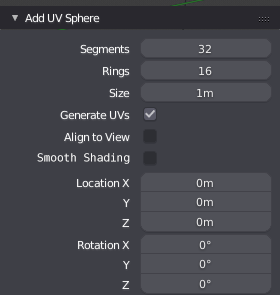
When we add a new object, some options are available, like it's position, generate UV, resolution, etc...
But we lack the shading type. And in my experience, the first thing I do when adding some primitives like a sphere is to change its shading to smooth because it's pretty rare that I need such "usually smooth" shapes set to flat shaded object, to begin with.
My proposal is :

- give the option to set the shading to smooth (i decided to do it as a checkbox)
- by default, set it smooth for primitives which make sense (i.e. a cube should stay flat, but sphere or Suzanne could be smooth shaded by default)
10 Comments
I find this an extreme annoyance, especially in 2.8. Most of what I do requires smooth shading on all objects, so I find I am consistently adding an object and then having to click "smooth shading". At least in 2.7 the button is accessible immediately and is a single click.
This becomes a huge issue in 2.8, as it is hidden in a menu. What used to take one click, now takes 2 clicks and two mouse moves more. On top of that, since it is in a simple text menu, it is also hard to spot immediately and requires my eyes to have to hunt for it (at first I didn't even know where to find it).
Although this isn't the best solution for when you decide later that you want an object smooth (which I think the solution would be an accessible toolbar to quickly switch shading methods), I think it would be a decent solution for the problem up front.
I was coming here to propose the same thing, but then I searched and found this post. So I wont foolishly create a duplicate, but instead I will contribute my 2.8 mock up (which is essentially the same thing): braedenlaverty.ca/downloads/images/blender_mocks/2.8_smooth/Blender_Smooth_Proposal-Update28.jpg
Anyhow, this seems like a pretty minuscule problem, but honestly, the number of steps and effort it adds really slows down the workflow and makes production annoying in Blender for me - I would also argue that the solution seems reasonably simple (although I am not a dev).
to insert an image in your message, use this code :
I believe this is part of the defaults being added to 2.8. If I'm not mistaken the default for torus, sphere and cylinder is to be smooth shaded. I assume with that change, the ability to toggle smooth shading will also be included.
It's listed here: T54943 the document says that open subdiv will be enabled on new objects as well. I wonder how that's going to work?
It doesn't say if the option will be available there, just that it will be set.
@loic.dautry: Right. I'm just making assumptions, because hopefully that and subdiv won't be required on every object made. Surely there will be a toggle for those. I usually want smoothing on, but I'm thinking about the many nuts that I have to make (as in what fastens a bolt; not what grows on a tree) and know that I will be wanting to turn it off sometimes.
What about auto smooth then for objects like cylinder? Make it enabled at something like 30* as default?
why not
@stepanovoleg.dev: We already thought about that, and the decision was to not do it. Auto-smooth is not for free, it's needs to calculate the angle constantly to define if it's smooth or not. So if you start modeling from a Cylinder and add detail you might find a performance hit just because of this option.
Better leave that choice to the user.
@Pablo Vazquez: Hi! Thanx for reply! Never thought autosmooth is an expensive option for rendering actually.