
Glare Node Remake/ Lens Flare Compositing Node
The common and usual way to add glow to a cycles render is the Glare Node. This Node analyses the image to find the brightest pixels, and adds a "Glare" Effect to said pixels. There are four options that one can choose: "Ghosts", "Streaks", "Fog Glow" and "Simple Star". (Tho "Fog Glow" is generally the preferred mode)
But let me explain why this Node is certainly not living up to its potential:
- The four options mentioned above, are extremely basic and do not fully resemble real-world Lens Flares. (With only "Fog Glow" being fairly usable")
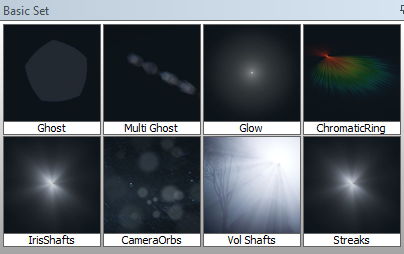
[Proposed new Effects are in the Thumbnail]
-
No Mask Input possible: The Node can only Input the full RGB colour Input without any possibility to Mask the desired areas in the image that need to be exclusively highlighted. That leaves the user to fiddle with unintuitive Threshold-Sliders within the Node.
-
Only one effect per Node possible: The UI within the Node is designed in a way, that forces you to use multiple nodes if you want more than one effect. That becomes very likely since realistic Lens Flares have many diffrent details and parts that are a result, of the complex Lens-arrangements, that are producing them. Having to use more than one Glare node at a time, also contributes to my next point:
-
Poor Performance: Adding only one Glare node into the Composition can slow down the rendering process immensely. (However, that might be resolved as part of the upcoming Compositor performance improvements)
My basic proposal: (This in only an Example!)
INPUT: Mask Input (BW) (Black: Off White: Glare)
Colour image: (If not plugged in: Output Alpha+Flares)
NODE: Pricipled BSDF Style Node with Sliders for each effect (Turn off effect by sliding slider to 0)
-
Position (Along the axis beween light source and image centre) [Effect an all Glare effects in Node]
-
Cromatic Ring (Saturation 0-1)
-
Ghosts (Amount 0-20) (Size 0-1)
-
Streaks (Intensity 0-1) (Imperfection)
-
Glow (Intensity 0-1)
-
Particles (Amount 0-50) (Size 0-1)
-
Tint (RGB Colour input) (Colour varience)
OUTPUT:
RGB: Image+Flares (If Image is plugged in)
BW: Flares on top of Alpha
And thats it.
This post was inspired by the recent development of the nitisha sky model that replaced an inferior node, with onee that I use everyday. I can only hope that the same will happen to the Glare node too!
Thank you for your attention. :)
Marcel
5 Comments
I like it. However, after making a virtual lens in Eevee to simulate a lens flare I would add the following. You should have node inputs to modify the various shapes, see the Bokeh Node for an example of this. You should be able to introduce noise that you can animate to simulate variation as the lens moves. Ideally there should be some sort of scene parameter to draw upon for this, as real lens artefacts suffer a lot of dynamic variation.
* @David McSween * exactly, i have also heard of a new algorithm that emulates Lens Flares and Lens characteristics, by only entering the Lens parameters
Actually blender needs seperate paint masking workflow for this work glare control. please upvote this thread for paint masking in compositor. blender.community/c/rightclickselect/GSgbbc/
* @mrajendra2150 * yeah, but I was mainly thinking about having the rendered image as a mask input and converting it to BW while extracting the desired 'glare pixels' with a Colour-Ramp. Exactly the same as in the old node, only that one can have more precise control over the Mask, without having to resort to unintuitive threshold sliders
Keep in mind, if one might want to combine specific effects at certain colours and positions, they could still duplicate the node if necessary. (Not ideal, I know, but better than the current solution and better than a node with 40 options)