
Edge Loop start from chosen edge
It would be very useful to have an option to pick a start position for open loops (with holding ctrl key).
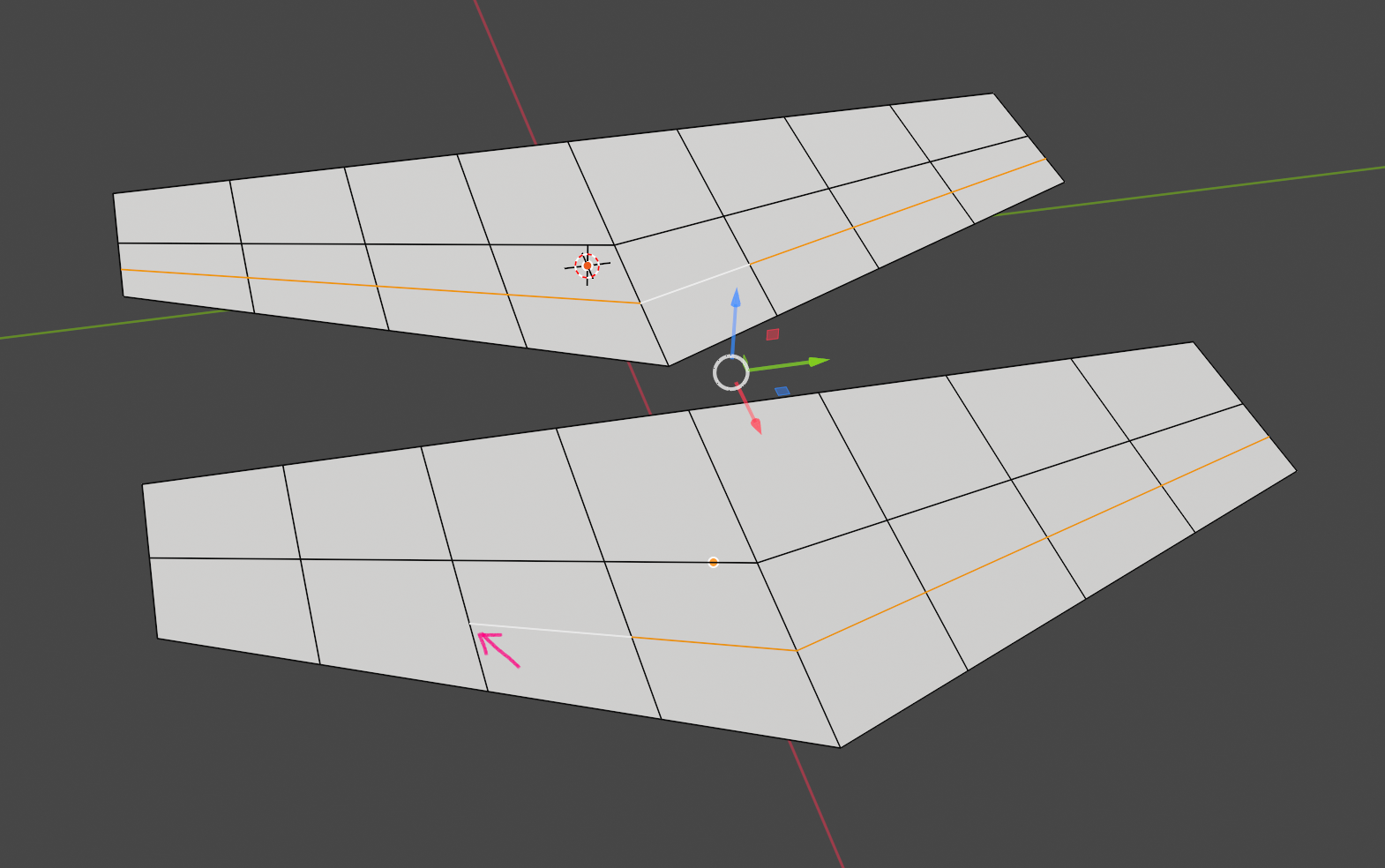
It would be very useful to have an option to pick a start position for open loops (with holding ctrl key).
6 Comments
how does this feature know which direction to create the loop?
Other 3d apps have it (at least one where I saw) so it was already solved. If you ask me, it could be one sided only with use of flip function after operation or can take under consideration from which direction cursor was moved before selecting edge line or where the position of cursor was before starting edge loop. There can be also better ways to do it. Not an obstacle to not having it, at least.
Hello,
This seems like a niche case, but I'm not against it (though my inner self cries out at the sight of an n-gon). The fact that it is in "other software" is neither a recommendation, nor evidence that implementation into Blender (or any other software) is "solved."
That said, I could envision a workflow whereby you hit Ctrl-R, hover near an edge but to one side, and hold Ctrl before clicking to select. This would show the loop starting at the indicated edge going in the direction of the mouse cursor at which point you could move the mouse to the other side of the edge to change direction. When satisfied, click to place, and then drag to position, or cancel to leave centered (as usual).
Current users would not notice the change so no problems there. Don't forget to add a hint on the bottom bar to help publicize the feature.
Hello and thanks for feedback,
I wrote about "other software" as an answer (that it was done before and to justify it is not my invention). What is possible in other apps may be not allowed in Blender due to core functions, agreed. I treat my proposition also as a part of a brainstorm and reminder, that adding new modeling tools is always needed. If they can be added without any harm to the workflow and easy - win-win situation.
I like your idea of handling it as an example of user-friendly approach.
I agree it will do not any harm because other users will not notice any difference. It will help imo to make redirection of edge flow a bit faster (other then full edge loop and removing edges, separate parts, or with knife tool (not always precise), or subdivide and then remove edges etc.
PS. Add a hint to help publicize the feature? I am not sure what to do?
Hello - Sorry about the confusion about the "hint." Blender's bottom bar gives context-sensitive hints about available actions with the mouse/keyboard. This would be the developer's task, and I threw the idea in just as a reminder so it is not overlooked. This will help users find the new feature (those who look at the bottom bar, at least) .
It is clear for me now, ty. Those bar hints are useful and important part of Blender UI.