
AutoMerge Editing
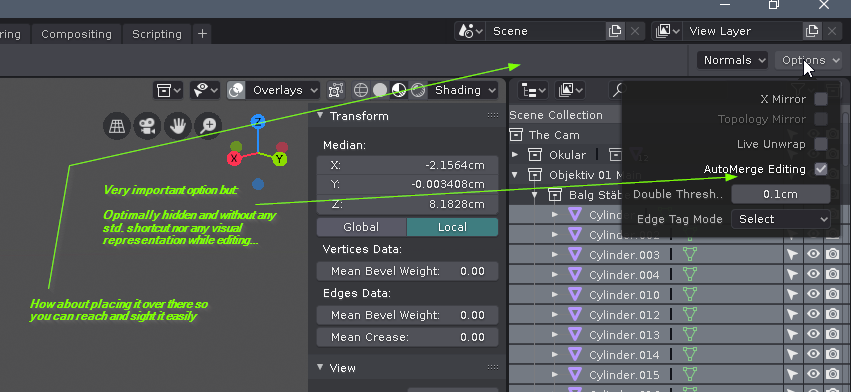
In my opinion the "AutoMerge Editing" option is not present enough. While editing it would be nice, to have better access to this option and to permanently see the status since the editing result is pretty different... My proposal is to give this option a top level presence and a standard shortcut. EDIT: Thematically it is very close to snapping. Maybe it could find a place near the snapping section of the UI
13 Comments
I put that into Quick Favorites menu
* @Vojtěch * same
Done in the latest build.
{attachment Screenshot_from_2019-05-21_13-38-30png}
* @Pablo Vazquez * I would preffer to be on the header bar than rather on tool settings, I dont want to keep an additional bar open. If there is no space , all these can be grouped under a single button called Other options or whatever
* @Pablo Vazquez * OK. But don't forget to activate the [3DView / Menu / View / Tool Settings] checkmark! Otherwise Pablos screenshot is hard to understand ;-)
* @eno.kahl * How about making the "Tool Settings"-bar transparent like the bar below?
* @Eno Kahl * exactly
Holy cow. I haven't even noticed that menu yet. I have been looking for AutoMerge for quite some time and couldn't find it. Yes, please! Move it somewhere more discoverable. The Top Bar was always related to the active tool for me.
what automerge editing would serve if in Blender we dont have a dedicated tool to merge vertexes (or also edges and faces like Maya target weld tool) is a more visual indicaton when both vertices are in the threshold distance ready to be merged, similar to the snaping indicators.
same thing with symetry editing, it should be present on the header
I think the whole menu should be somewhere more visible, or the individual elements integrated into other menus, or as icons near the snapping button, as suggested. Personally I use the mirror option quite a bit, so a button for this, would be appreciated.
* @matthias.linsbauer * These popovers are available as panels in the Tool Settings tab in the properties editor.
That being said, some settings like this one need to be exposed more (also detail size when sculpting with dyntopo IMO). Once the final merge of the topbar into the editors is done we will look into exposing the must-have settings.
* @Pablo Vazquez * Sounds good... Anyway I underscore the permanent visibility of such important settings. This drasticaly reduces the amount of undo-actions ;-) and if not you allways have to test if there was a proper merging! How about giving a short blink in the status-line saying: "n vertices merged" so we can relay on what we thought blender has done! Many other transforms or actions are obvious in their result. Merging not!