
Orbit around selection only in sculpt mode
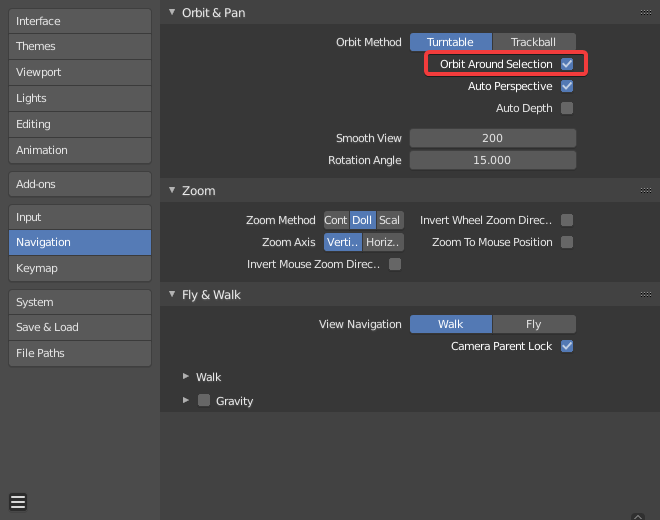
I recently discovered the orbit around selection option of blender which is very handy in sculpt mode to use only a graphics tablet for example, because it allows to center on the working area.
But I find it annoying not to have options to have this option only in sculpt mode, because in object mode, I often work on large environments, and I'm used to move via SHIFT+B and pan the viewport as I want independently of my selection.
Having to change these settings every time doesn't seem the best option to me.
5 Comments
It appears that you've clearly defined an issue that you're having but I don't think you've fully described the solution that you're proposing. Do you want another option in Preferences? Or would you prefer a hotkey or button to toggle this feature without opening Preferences?
In either case, where would you put the control in Blender's interface?
* @Jason van Gumster * I am sorry if my proposal was not clear, it describes more the problem than the solution, as there are several solutions.
For me I think that having an option dedicated only to the sculpt mode would seem the most adapted (because it is already possible to create an addon to activate or deactivate this option).
it could be an "Orbit around area of sculpt" option in the preferences.
* @yoann softyoda * Just use PME addon for such your own very custom things.
* @IIIFGIII * Thank, I didn't know this addon, he could be useful to me, although I think it would be interesting to look into the issue of workflow (make orbit around work aera by default) to make life easier for as many people as possible.
* @yoann softyoda * Emm ... IMO - very custom request. One way or another - you have to use such things as PME to customize Blender for your self. Default Blender is something average for all possible users and as result for no one pro. This addon can change your Blender work signically, believe me. Let's call it " way of samurai " from noob to pro.