
improved material UI and usability
Hello every one, here's my request/idea.
I think Blender improved a lot in terms of usability in the last versions, however, there is something which never improved but it's of crucial importance in any workflow, I'm talking about the material/shaders creation and application.
The workflow that is available now is ok/usable, but it's far from being user-friendly, I think that everyone learning Blender got stuck on some steps of the materials handling. For example, the following steps are not intuitive at all (and are very different in terms of workflow from any other software I know):
-how to apply a material to multiple objects,
-how to erase a material from the file
-how to access all the created materials in a scene
A rework of the material system would be much appreciated, in particular, it would be useful to have the following features:
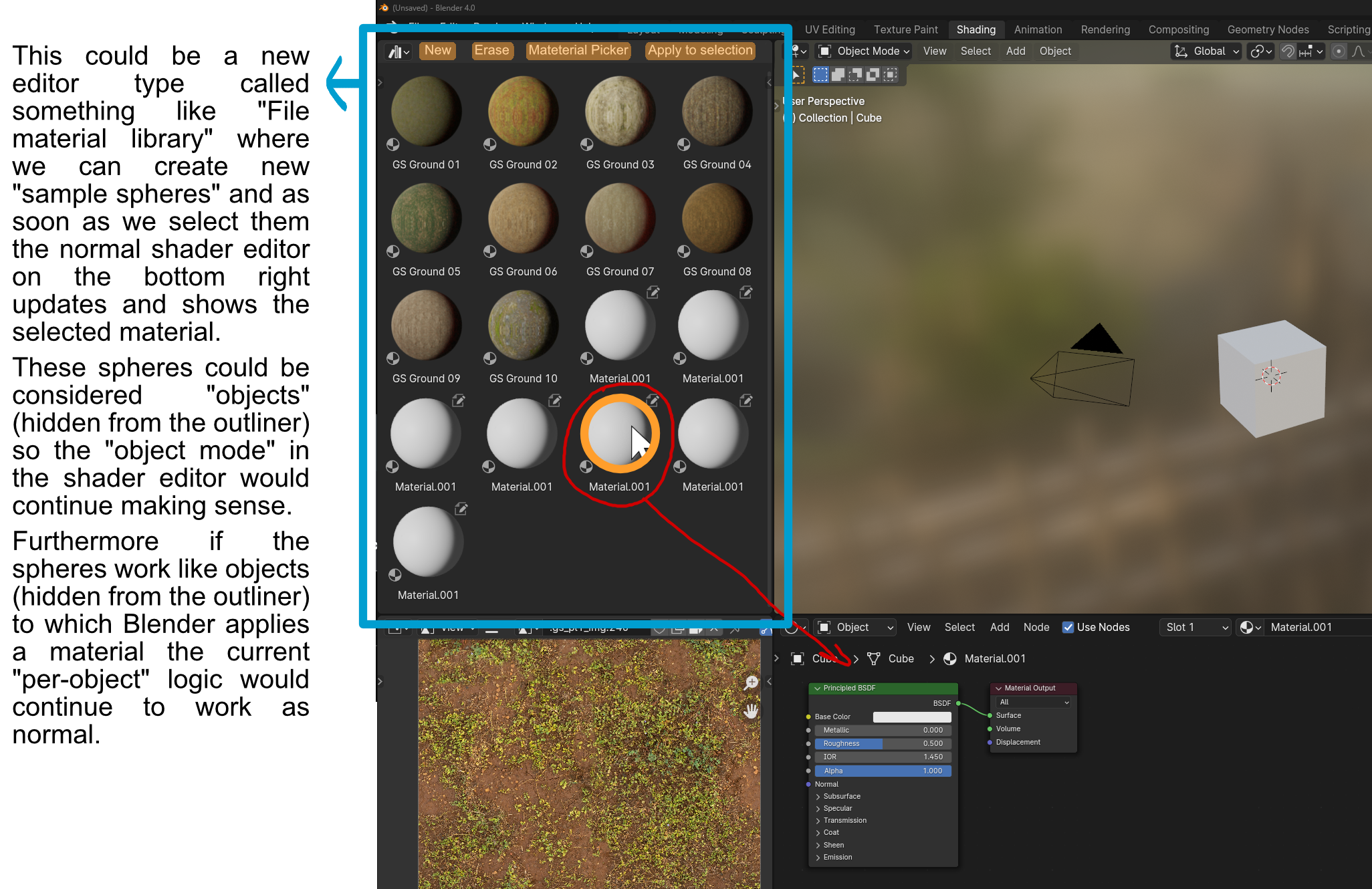
-a local (per-file) material library where I can create/store all the materials that I create in a particular scene (without worrying they will be erased as soon as I close the file)
-create materials without anything selected or without necessarily needing to apply them to anything
-delete materials (without needing to reboot Blender)
-a button (or drag and drop) that applies a material to the entire selection (without needing to do the cumbersome sequence of steps that requires us to select a bunch of objects, select again one of the objects to make it the active selection, then click Ctrl+L and link their materials)
-a material picker which allows us to click on an object and highlight the material in the library.
I hope I didn't duplicate the request, but I wasn't able to find anything related on the forum, thanks for reading, Riccardo.
13 Comments
Yeah, sounds like stuff you get in other major packages pretty much 1:1. Seems like Blender forces users to work on very low level which felt very strange when coming from other 3D packages, even if I had years of experience from other software and some programming background too. Blender's way of operating with scene assets feels more like it is done on programmer kind of level, using only material slots view or the outliner as your views to manage scene data. Definitely a proper material editor with a proper "palette" view and option to load and save materials as some sort of material libraries (not blend files) would be great, sort of layer of abstraction, but I'd still keep the access to scene data like it is now too.
Delete materials (unlink) is pretty much the worst thing currently. Howcome one can expect a beginner to be able to change outliner to some other mode, and the do removal of "orphan" assets, or delete the material (in outliner modes that it is actually even possible) to really get rid of material without restarting the editor? And there is a Cleanup unused data blocks in file menu, but that too is way too obscure.
I've solved this myself for now while we wait an official solution for this :), you can have a look at my GitHub page if you like.
The plugin adds a tab in the shader editor called EasyMAT that allows to: -create and preview new materials with no meshes selected -assign or unassign materials to one or multiple meshes with one click -setup of displacement with one click -import multiple textures and assign them to the proper channels with one click -setup normal or bump map with one click
github.com/Riccardo-Foschi/Blender-EasyMAT
Hi guys, is there any way to boost a thread? I'd like to try revamp this old thread and maybe get some upvotes.
The asset browser kinda does it. You can't create/delete materials, you instead mark/unmark materials of your scene as assets, but that's a library system. And I don't think it needs to be able to create/delete materials (or any asset), just handle them as a library is enough.
We do miss this, though figuring out the UI and UX would be nice.
Personally, I was thinking maybe we could have a generic "All" shading type:
And when using it, have simple material list of all materials of the file (or at least the scene). Why not have an asset shelf like the viewport's to display the material lists.
You can do it in the outliner in Blender-File node:
Otherwise if you have a bunch of orphan materials, you can also go in the outliner's Orphan Data mode and click the Purge button.
Being able to drag and drop from the Asset Browser/shelf to the whole selection would be nice. As for having a button to apply a material on a selection, I think there is better to do:
In Blender you can hold down Alt to propagate an action from the active object to the whole selection. It doesn't work with materials, but it could be done so, and it would make it use of a feature that's already there and people would already expect to work anyway.
I think that's a feature request for the Asset Browser and could be made for any asset type.
"you can do it" ain't the same thing as something being intuitive and nice to use. The whole procedure of managing materials is really backwards compared to other 3d softwares TBH.
Other softwares are not Blender. They don't have a shader editor that edits an object's materials, they don't have an orphan system. The goal of this website is precisely to figure out solutions to fit what we need in Blender.
Orphan system does not affect material editor, if such existed. It is an implementation detail. The issue here is IMO the thing that user has to understand and manage "low level" arrays and lists when there should be no need. User should only need to worry about how he/she crafts (create, duplicate, change, remove) materials in material editor, then make it easy to add and remove materials in object or several objects, also make it easy to save and load material libraries into blend-file, or as a separate file.
Also, not exactly sure what you meant by "They don't have a shader editor that edits an object's material" - for example Maya has Hypershade and 3ds Max has Material Editor, where you can edit material details.
I have never heard that? The only thing the user has to understand is that Blender removes unused data on file load. With it comes the understanding that, unlike in other softwares, you do not "need" to manually delete things all the time , Blender does the cleaning up already. That's the basic thing that goes a long way.
IMHO if your concern is to let the user worry only about the craft and have the software do the technical things, then the current system sounds like a huge advantage: no need to worry about cleaning up, and you can recover things you removed if you didn't reload your file yet.
It's like the difference between a city that requires you drive your trash yourself to a landfill versus a city that have garbage trucks coming right at your doorstep.
Now we could have an actual delete button in the properties/shaders editor, but that would require to figure out a new icon for the current "remove" button to avoid confusion. And it would raise the question of what to do when you try to delete a data block used by other objects. Popup warning? Delete anyway?
What I mean is the context isn't the same : Maya's hypershade edits the materials on the project level, while Blender's shader editor edits the materials on the object level.
This is part of why clicking the X button in either properties editor or shader editor removes that material from the object instead of from the file, it makes sense in that context and it avoids potentially deleting a material used in another object.
On the other hand, the orphan system allows the files to automatically cleanup itself as you go.
While other softwares like Maya will keep every single bit of data you ever created until it goes corrupt or you decide to manually clean it up, Blender deletes any unused data (aka orphans) at load time. Hence the "fake users" system to protect the orphans that you want to keep.
If for any reason you want things gone "right now" and can't wait for the orphan cleanup, only then you need to either use the outliner or the File > Cleanup menu or reload your file if you really want to go old style.
But, I don't know a case where that is an actual necessity. Though I'd be interested if you know some.
Well not sure what you are trying to say - I personally would rather edit materials in some sort of library that resides in scene/file. Adding materials to some objects should be optional. There is nothing preventing Blender from doing the same, if the devs wanted to add this functionality.
I think these last two comments synthesise the problem perfectly ---Blender works the shaders at the "object level", others software packages do it at the "scene level"--- I think the current situation in Blender is usable, but it is far from being user-friendly. Abandoning the "object level" type of handling shaders toward the other method, would help a lot with the simplicity of use mainly because 99% of other 3D software I know use the other method already (and I know a lot of them, it is almost 15 years I work with 3D software and I don't know anyone using Blender's logic)
To me the idea of having a new "all mode" in the shader editor would be great, as far as I have a way to access the list of created materials easily and as far as I'm able to apply them to multiple objects easily, and as far as they will not disappear if I don't apply them at anything before closing Blender (maybe for this last thing, it might be sufficient to create the materials in this "all mode" with the fake user selected as default)
I edited the original post and I added an example with an idea about how the new material library could be implemented (how to add images in the comments?)