
Please swap Join Strings and Join Geometry
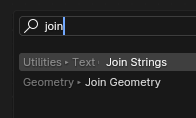
When working with Geometry Nodes, typing "Join" after Shift+A will produce 2 selections:
Join Strings, and
Join Geometry
In my experience, I use Join Geometry way more than Join Strings. Would it be possible to swap these two? It makes sense when you think alphabetically as well as their order of appearance in the Add Menu.
It's not a huge thing, but reducing the number of clicks/key presses will help me move faster.
If there's a way to do this manually, do let me know.
Thanks for reading!
6 Comments
Doesn't whatever option you choose show first after the 2nd time you use it? So if you search for
Join Geometryand use it, the next time it will be first.On a different note, remember that you can also simply type the first letter of what you're searching. So searching for
JGwill give you J oin G eometry.The order I tried is fixed. Even if I enable (Sort by Most Recent).
where do you enable this? thanks!
regarding "show first after the 2nd time you use it," it doesn't apply for me whenever i type "join"
But I didn't know that using first letters was a thing. This is very helpful! I'll definitely incorporate this into my workflow! Thanks Pablo! ^_^
It's the same for "delete" and "delete geometry"
Marking this as Done!
Current Blender (5.0):