← All ideas2 Jun 2019BulatOpenModelingUser InterfaceBulat1COD3DSinghVFXBDWCobraCristsoftDaWaiWaiDraiseHarisreedharHokussKoraxLillyaMizManFryingPQuesbeR_dvaRockbardRogoShimoonStroblendVyachWilsonalbertdeariasamoleraandyp.123bnzsdaniellapalmedanielpaulus90dpdpforlifejasonjaxxtrendjerzy.gorski.artjfrasermjustastatuekolovedlacina.vojtechlcs.cavalheiromarcusmasinisa89matan.golombmep84nanomanpropablovazquezpawellyczkowskipitiwazourichardhnobleromanvolgushev4565simonstoschusineotesturewo262yianni.papaziszuorion
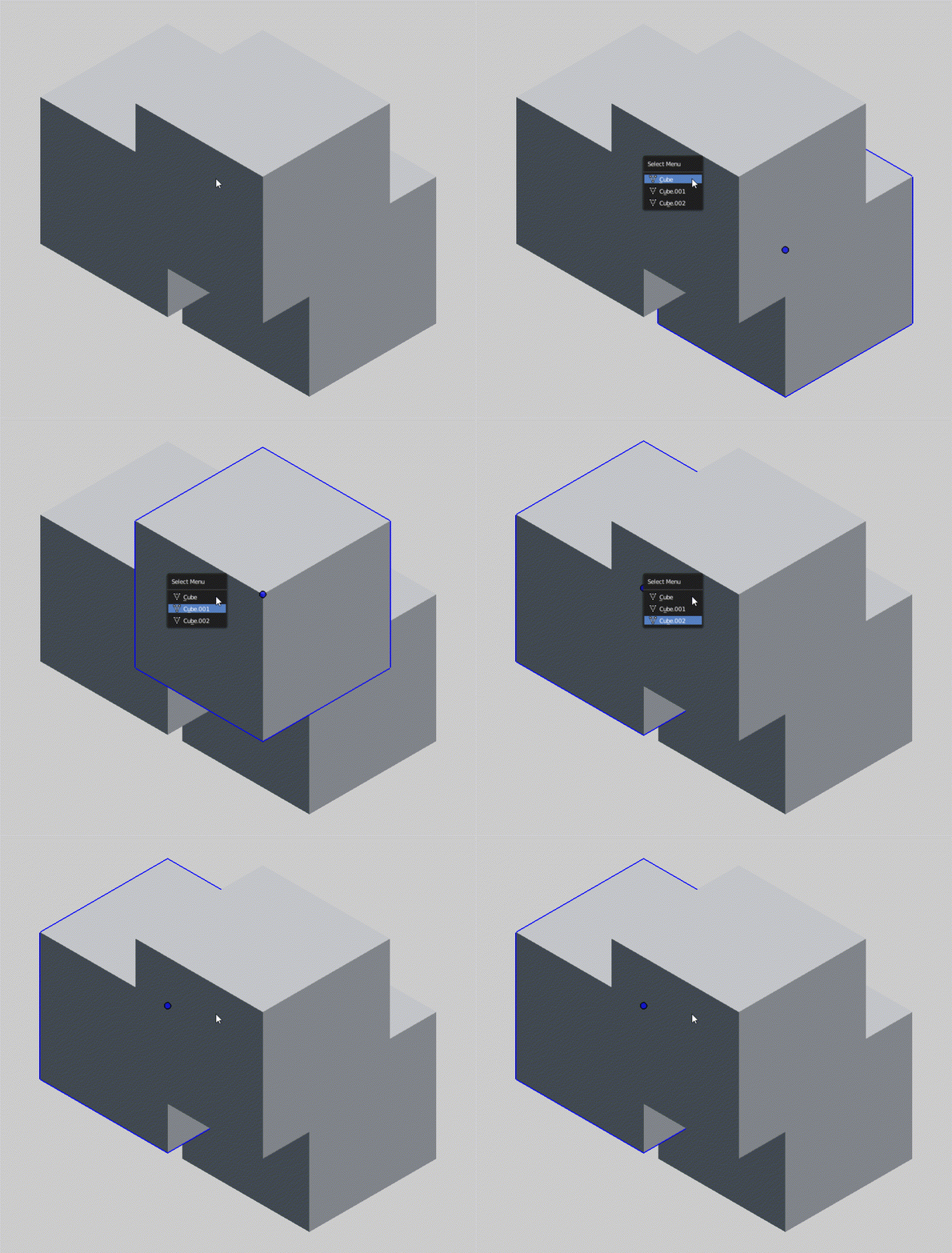
Highlight object when use "Select Menu" ("Alt+Right mouse button" on overlaping objects).
98.1%
Development Status:
Open
Upvote51Downvote1
B
Bulat
2 Jun 2019
6 Comments
d
dpdpforlife
How has no one come up with this yet? Great idea.
1
1COD
for info this is not what you are asking for but this is a solution I found for myself.
-I created a second key without any menu appearing so I have to click several time and my selected object is highlighted... but I kept shift clic for this one.the one at the top.
-and the second key shift alt clic is the original one with the menu of selection
I didn't like the menu in front of my eyes even if it is good sometimes because you see the name of your selected object.
the 2 shortcuts are in 3DView>3Dglobal. you make new at the bottom of the same path if you want to create a new key and copy the same name in black box "view3d select" and make appears all exactly like in the picture. don't save and just try to see the effect before. and tell me if it was a kind of fix for the moment....and important you can export your keys to make some saves...
{attachment Blender_3jpg}
z
zuorion
Oh yea, great idea.
Selecting objects in crowded areas would be mush easier. Now it is
guessing game
:f.
j
jason
*
@Pawel Piotrowski
* Unless you name your objects appropriately... which you obviously do, right? ;)
2
z
zuorion
*
@Jason van Gumster
* sometimes even proper names don't help :f
1
M
MickHanks
*
@Jason van Gumster
* Great point, That's why I setup a script to ask me to name the object when adding it to the scene. So all my objects get named. It's may seem like a pain but it pays off quickly. I also setup a script that I can double click on an object and I'm in edit mode and double click off the object to get back to object mode.


6 Comments
How has no one come up with this yet? Great idea.
for info this is not what you are asking for but this is a solution I found for myself.
-I created a second key without any menu appearing so I have to click several time and my selected object is highlighted... but I kept shift clic for this one.the one at the top.
-and the second key shift alt clic is the original one with the menu of selection
I didn't like the menu in front of my eyes even if it is good sometimes because you see the name of your selected object. the 2 shortcuts are in 3DView>3Dglobal. you make new at the bottom of the same path if you want to create a new key and copy the same name in black box "view3d select" and make appears all exactly like in the picture. don't save and just try to see the effect before. and tell me if it was a kind of fix for the moment....and important you can export your keys to make some saves... {attachment Blender_3jpg}
Oh yea, great idea. Selecting objects in crowded areas would be mush easier. Now it is guessing game :f.
* @Pawel Piotrowski * Unless you name your objects appropriately... which you obviously do, right? ;)
* @Jason van Gumster * sometimes even proper names don't help :f
* @Jason van Gumster * Great point, That's why I setup a script to ask me to name the object when adding it to the scene. So all my objects get named. It's may seem like a pain but it pays off quickly. I also setup a script that I can double click on an object and I'm in edit mode and double click off the object to get back to object mode.