
Elastic Edit Mode
Proposal
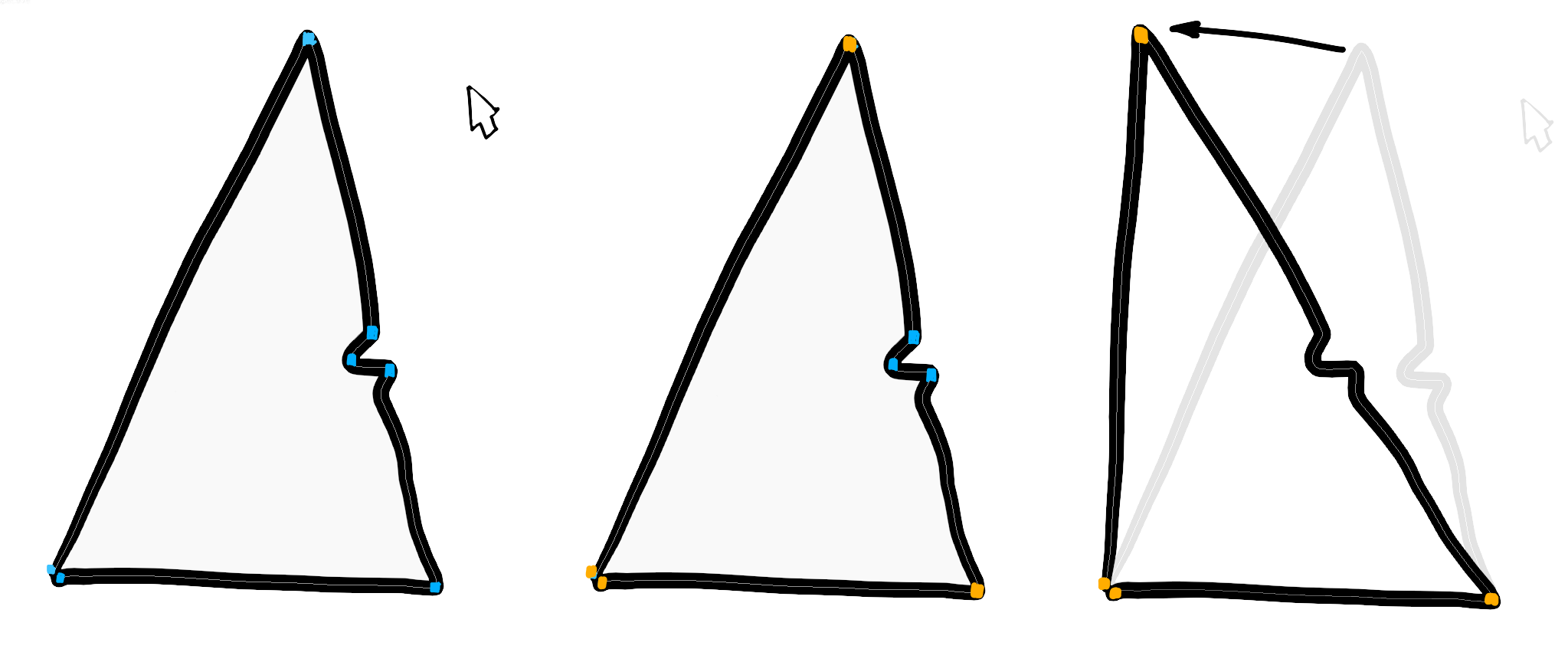
A new edit mode. I'm calling it 'elastic' here. It's a way to edit strokes by manipulating 'corners'/'pins'.
I imagine using elastic mode in two stages:
- User designates a number of 'pin' vertices in the stroke. Blender highlights candidate vertices based on angle, trying to find 'corners'. The user clicks any of the highlighted vertices that should be used as pins.
- After pressing return, the user can manipulate the pins by dragging. Refer to mock-up image to understand how intermediate vertices are affected by dragging. Pressing return a second time commits the changes.
6 Comments
Looks like proportional editing powered up. It would be nice everywhere, not just for strokes.
I don't really see the value compared to current curve edit mode where control points are determined by an angle value.
* @Ronan Ducluzeau * you can't do what's pictured in the mock-up using curve edit mode.
* @Ronan Ducluzeau * You don't have pinpoints, that's the big difference. See After Effect's pinpoints if you want to see a more advanced use of this kind of tool.
You can kind of obtain some similar result, if and only if you can have your radius not too big to not transform the bottom points and big enough to have the right amount of transform to get the wanted result; which requires time for trial and error to figure out and is not always physically possible in the first place.
Right now the only way to do something close to that would be to set up some bones I guess, but that's a long process compared to point & click some pinpoints.
* @tomasz.brain * The goal of Curve Editing is to have few points to control the stroke. If I have to select 3 points instead of 20, I am happy. If I have to change handle type of control point, no problem.
But selecting 1 instead of 2 or 3, I don't see it as a huge gain.
My conclusion is that we can already obtain quickly any shape by lots of various method. I don't see the reason to go that far into that direction of simplicity for user It will have a cost for development to maintain that. I don't think the result will be well-balanced. I am against another mode. If developers think they can do it, OK. But IMO, it should be better to have it as an option in Curve Editing popover.
* @Ronan Ducluzeau * You perhaps wouldn't use it. I'd use it many times each hour, especially when manually creating inbetweens.
The automated grease pencil interpolation doesn't allow for moving landmarks along an arc, which is very often what you need in traditional animation. Elastic mode would speed this up a great deal.
You can't easily replicate the process pictured above with curve editing, with any of the current sculpt tools, or with deform.
You can eventually get a similar result with many more clicks. Try it with a triangle like the one I used, with some detail on the sides that needs to be preserved. NB. No additional curvature should be added to the sides as its shape is altered.