← All ideas3 Nov 2017SavMartinOpenRenderingSavMartinAPECAnityExBleckplumpDraiseGhisYury_Ziankoyuskialexeysalopinaprendizdetodomaestrodenada72arunbharathi555austinberenyibnzscaphalor11ckat609contatodraise14eduardo.diaz.268etufo2fotouhabadi.migiornotigiisochrom1jachym.michaljacqpretjuangeakotulskylepolygonlucianomarcel.quintasmarcusmasinisa89micke.pltofuscadoole00larsenoobmapitiwazousilexsoku.visthornydrewesvdeswindows2000wo262wouterstompxan2622xerminatoryopiezebus3d
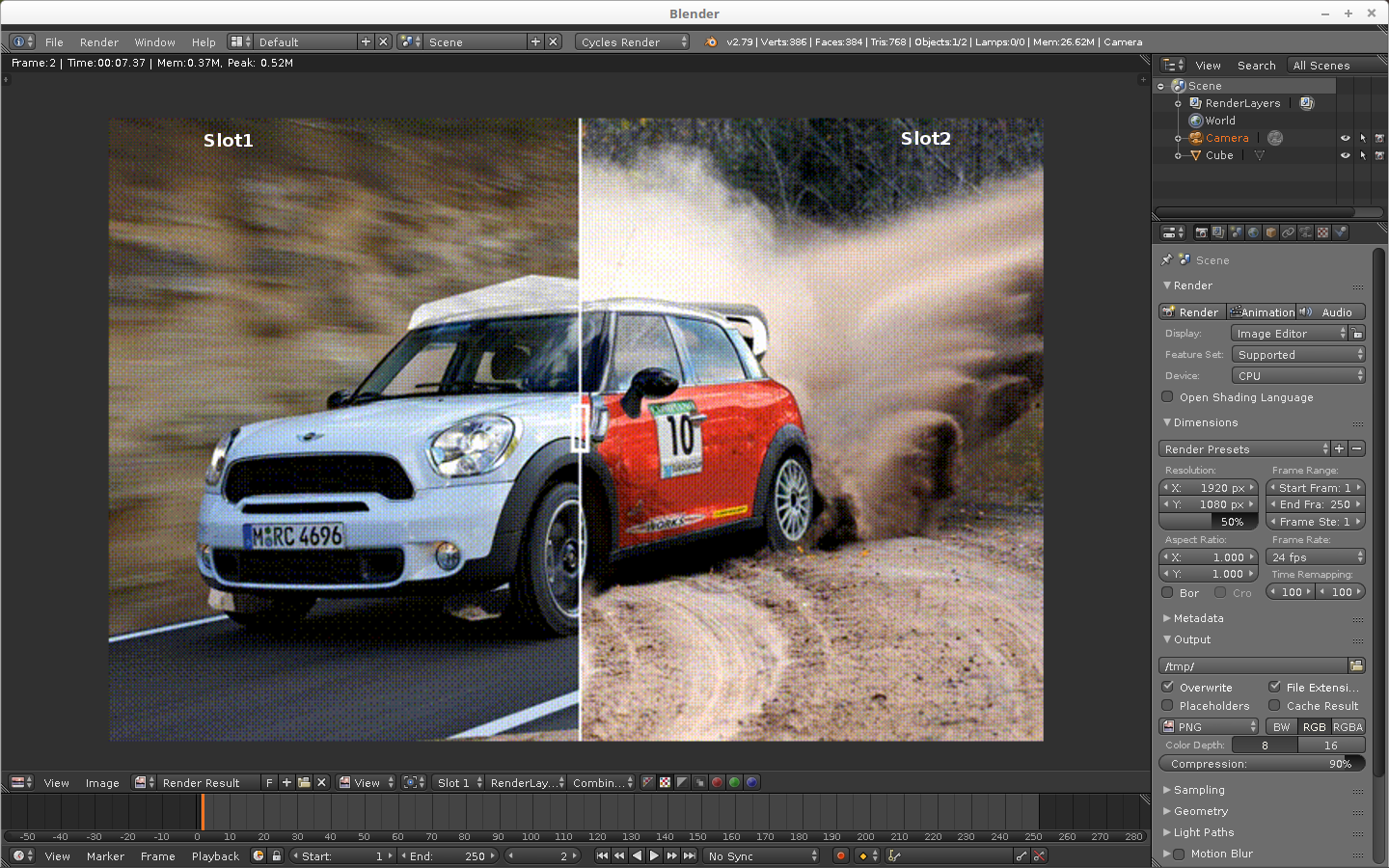
A comparison slider between the two views with a widget to toggle which slot on which side would be.. VERY HANDY, and intuitive. (instead of only a full view with single slot)
4
a
alexeysalopin
Yes, this feature would be so useful for optimizing render settings and look dev. All modern render engines have render viewers that allows A/B comparison. Cinema 4D, V-Ray, Redshift, Octane, Arnold for example
1
j
jason
How would someone enable this viewing mode in the image editor? Would the controls be in the View menu, or one of the shelves?
1
S
SavMartinAuthor
@Jason van Gumster:
I think will be better, one of the shelves, and when you click on the slot name in the image yo can decide which one to use.
j
jason
@Sav Martin:
So what happens with the slot selector in the header? Does that go away?
S
SavMartinAuthor
@Jason van Gumster:
Of course no, its will be like now, my wish its to implement this like a plus alternative..
j
jason
The reason I asked is because the slot dropdown only lists a single slot. So if that's still there, but the user is doing a split view, then it could be pretty confusing. It may be wise to hide that drop-down if split view is enabled.
S
SavMartinAuthor
@Jason van Gumster:
It look a good solution , thx
n
nucularjohn
Go to Node Editor > Compositing nodes (use nodes) > Add > Output > Split Viewer.
(Is that what you mean?)
S
SavMartinAuthor
@nucularjohn:
Not exactly, I want to be able to start a render,see the result and then make some tweaks on my scene and start a new render over slot2 o slot3 etc,after that select which slot yo want to compare and then slide to detect whats different to decide what changes are better for a good result.
I think this will be a better way to make test, better than the node split Viewer..
2
l
lsscpp
@Sav Martin:
I find way better the way it is now: just press 1 and 2 (or 3, 4, etc...) on the keyboard and the viewer shows the render in that buffer.
It easier too for the eyes to spot the differences without the slider in the way, imho
3
S
SavMartinAuthor
@ :
Yes, i know that way , but i think this way in one shoot you can compare , the way of switching need more time to appreciate small differences. ***** in my opinion ;)
l
lsscpp
@Sav Martin:
More time? Really? I often have two fingers on two keys and can make many switches in one second!
1
S
SavMartinAuthor
@ :
More time, not in pressing two fingers, some time I need to see booth pictures at the same time to appreciate some small tweaks.. if I'm switching, its take me more time to decide (over 10 switching) , yes i know, I'm very "raro" ;). I think its just a question of taste.

14 Comments
A comparison slider between the two views with a widget to toggle which slot on which side would be.. VERY HANDY, and intuitive. (instead of only a full view with single slot)
Yes, this feature would be so useful for optimizing render settings and look dev. All modern render engines have render viewers that allows A/B comparison. Cinema 4D, V-Ray, Redshift, Octane, Arnold for example
How would someone enable this viewing mode in the image editor? Would the controls be in the View menu, or one of the shelves?
@Jason van Gumster: I think will be better, one of the shelves, and when you click on the slot name in the image yo can decide which one to use.
@Sav Martin: So what happens with the slot selector in the header? Does that go away?
@Jason van Gumster: Of course no, its will be like now, my wish its to implement this like a plus alternative..
The reason I asked is because the slot dropdown only lists a single slot. So if that's still there, but the user is doing a split view, then it could be pretty confusing. It may be wise to hide that drop-down if split view is enabled.
@Jason van Gumster: It look a good solution , thx
Go to Node Editor > Compositing nodes (use nodes) > Add > Output > Split Viewer.
(Is that what you mean?)
@nucularjohn: Not exactly, I want to be able to start a render,see the result and then make some tweaks on my scene and start a new render over slot2 o slot3 etc,after that select which slot yo want to compare and then slide to detect whats different to decide what changes are better for a good result. I think this will be a better way to make test, better than the node split Viewer..
@Sav Martin: I find way better the way it is now: just press 1 and 2 (or 3, 4, etc...) on the keyboard and the viewer shows the render in that buffer. It easier too for the eyes to spot the differences without the slider in the way, imho
@ : Yes, i know that way , but i think this way in one shoot you can compare , the way of switching need more time to appreciate small differences. ***** in my opinion ;)
@Sav Martin: More time? Really? I often have two fingers on two keys and can make many switches in one second!
@ : More time, not in pressing two fingers, some time I need to see booth pictures at the same time to appreciate some small tweaks.. if I'm switching, its take me more time to decide (over 10 switching) , yes i know, I'm very "raro" ;). I think its just a question of taste.