
Render Region on Blender 2.8
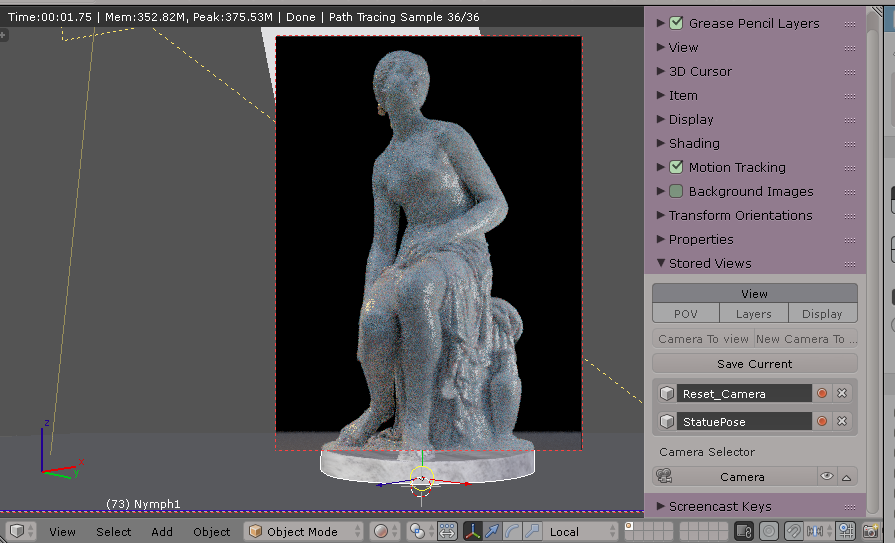
Render region allows you to define small sections of the 3D view defined by the user to render small portions on heavy calculation for object, sim, hair, smoke, etc. (Demo video at the end of this post).
Goal: Single click user keyboard shortcut to draw render region to render. Tap+Tap the same key to clear render region.
<h1>B3D current workflow: </h1> To activate a render area in Blender you need to do a 4 step combination key:
- Draw (define) the render area by using CTRL+B (box select supramode)
- Press Shift+Z (shortcut to render full Cycles render mode shading)
- Wait for the region to calculate lights, material and camera, then Cycles renders.
- Press Shift+Z (toggles back to previous Shading mode before rendering - usually SOLID)
- Press CTRL+ALT+B (box select supramode clear)
// If the user skips step 4, and jumps to step 5: The entire viewport renders. This is not convenient on heavy scenes with lots of materials and lights, since this can freeze the application. Thus the 5 steps must be done in this order correctly every time the user needs a preview (see attachment towards the last part of the video)
<h1>Desired workflow for Blender 2.8</h1>
User can press Q and draw a render region, after mouse button release, render region immediately shades to RENDER mode. To clear this render region area: user single tap Q without moving the mouse and render region CLEARS.
Future features could also achieve:
<i>Render region can "save" current camera position and shading buffer. User can click "Revert scene to here" and all shaders, materials and lights go back as they were stored in that buffer (maybe a flagged step history on the console to certain point / state?)
Render region has a slider to set the quality of the sampled render points. The top and bottom values are taken from the render settings on the property area. The slider will go from PREVIEW (low samples, less than 200) up to RENDER (500+ samples) on Cycles.
The camera on the scene could be matched up in size equals to the area of the preview with a button called (Copy render region to camera). The next time user press F12 to render the camera view, the render will match to the render region area. (The top value of the render area is matched to crop the camera´s top side).
User can save image directly from render area once it´s rendered using a button above the defined render area. No need to enter (CTRL+F12) UI window.</i>
<h1>Front end</h1> We know the shortcuts for rendering an area are located on FILE>User Preferences>INPUT>Keyboard. These are the RNA functions that invoke the commands and render when you search for "RENDER":

So we can see the order of the user to invoke these functions:
view3d.render_border
view3d.toggle_render
Render gets represented
view3d.toggle_render
view3d.clear_render_border

<h4>Script evaluation for the functions to work on the RENDER AREA</h4> 1. User presses "Q" (or any other custom defined keyboard shortcut) and the keypress is timmed to just a TAP (no mouse action to listen to in the following 0.2 seconds), script checks if there´s an "view3d.toggle_render" active (checks if there is an area + if that area has a shader mode set to RENDER and if a view3d.render_border exists on the scene viewport) If there is: toggle back to previous shader mode and clear area with view3d.clear_render_border. If there´s not an area defined and no toggle_render, and no mouse event was trigger, do nothing.
This way the script checks if there´s a previous rendered area first. Then reverts back to the last shade mode (toggle) and clears the region if one exists in the viewport. If it doesn´t exist a render region rendered, Q tapping doesn´t do anything.
OR
-
If the user presses Q (user defined keyboard shortcut) and the keypress also registers a mouse "listen" action move within the next 0.2 seconds, then the user can draw the render region using the (predefined selection mode from the user preferences as SELECTION //in our case: we select with LEFT mouse key) drawing the render region area with the mouse pressed, but once it RELEASES the left mouse key: render area in pixels is defined, and immediately executes: view3d.toggle_render.
-
To clear render area user taps "Q" and releases. Render area clears out and render mode goes back from the previous toggle mode.
Thank you for this opportunity on the new Blender 2.8
GLOSSARY:
Cycles = Blender's amazing render engine.
RNA = Blender internal API calls binded to Python commands
Supramode = State of Blender where no other key or command is listened until the supramode combination is over, completed or ended (for example: "C" to circle select).
Please notice this proposal already runs in code outside Blender, so it is possible to implement natively. Though the addon and the chunks here and there make it inoperable for new users and difficult to understand.
5 Comments
Not sure if you know this addon. i think it does all concerning the press Q and instantly start rendering. That other part i see with interface and all kinds of settings its not added. But you dont need to pay $390 for that, thats quite some money i think. github.com/CenekStrichel/CendaTools/blob/master/cs_render_tools.py
* @romboutv * I found about cenda tools long before your reply :). I posted the video on YT about cenda install. I was expecting to develop a better render region with the comm(unity) so...
Meantime you can use updated version of this simple script: pastebin.com/kv8DZGs1 .. But I still don't know how to draw the rectangle in the viewport :-D
Contacted a py coder on fiverr. Guy's cost is $390 to create this in 4 weeks. Should we fund raise?
You have it mapped nicely. Would be fun to try implement into BFA later.