
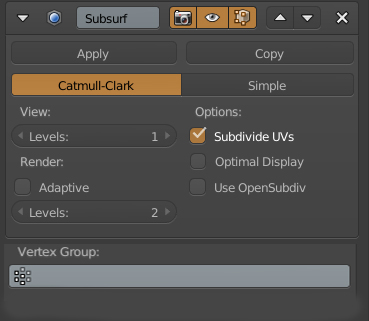
Subdivison Modifier : Choose Vertex Group
Hello
it would be nice to attribute the subdivision modifier either by a vertex group or a weight map
a vertex group :
- subdivide only the vertex group selected
if weight map :
- blue 0 subdivision red 100% subdivision
if adaptive subdivision is enable , adapt only the pixel rate ratio
thanks
This idea was marked as a duplicate of Add Vertex Group selection to Subsurf Modifier.
6 Comments
I don't think you can have anything other than 0% and 100% subdivision: faces are either split or not, it's an absolute fact.
What would 50% subdivision look like?
@R. Navega:
if one level of subdivision : blue = 0 red = 1 if two level of subdivision : blue = 0 in between = 1 red = 2 if tree level of subdivision : blue = 0 in between = 1 in between = 2 red = 3 if four level of subdivision : blue = 0 in between = 1 in between = 2 in between = 3 red = 4
@R. Navega: I think he's saying to multiply the subdivision levels by the vertex weight. I still can't see how it could be applied when you have multiple different weight divisions across a single plane.
Is you had SubDiv = 4 and a single plane with vertex weights 0, 0.25, 0.5 and 1 what do you imagine the subdivision would look like?
great idea
Can you expand on how sub-division would work on quad+ planes that have 1,2 or 3 verticies in the group, but not all of them?, and lines with only one vertex in the group.
How would you resolve clashes with 2 subdivision modifiers on overlapping vertex groups?
Great idea!!!!!!!