
Mark Smooth
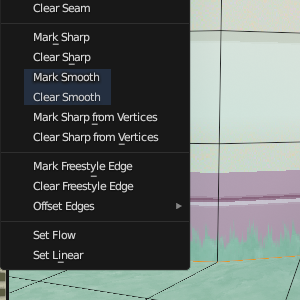
Add the ability to mark edges as smooth.
Just as "mark sharp" overrides auto-normals for an edge to force it to be sharp, "mark smooth" would force it to be smooth.
Mark sharp is good for sharpening edges that are just missed by auto-normals (and where adjusting auto-normals angle to account for them would mess up other edges).
Mark smooth would be useful in the opposite case: in the picture, all hard edges elsewhere on the model are correctly sharpened by auto-normals, but I want to make an exception for this wall's bottom edge so the grass appears to continue from the floor onto the wall without a visible edge.
The workaround at the moment is to set auto-normal angle to 180 and manually mark intended sharp edges. It might also be possible to use vertex groups with geometry nodes to selectively smooth shade edges (not tested). Both require manual intervention, and vertex groups don't always map to edges well.
Sharp and smooth edge marks should be usable at the same time on a model (but only one at a time on any given edge, naturally).
(Adding this would contribute to bloating the edge menu; maybe all edge marking operations should be broken out into a submenu or seperate menu?)
3 Comments
Yes! I need this for basically the exact same usecase.
You have this in the Mesh/Shading menu. But you can do it directly with normals Split/Average etc.
Mesh/Shading/Smooth just does the same as clear sharp in the edge menu (call
bpy.ops.mesh.mark_sharp(clear=True)).Normals/Merge does smooth the selected edges, but does so by "baking in" sharp data (marks sharp edges and disables auto-normal angle control), so you lose the benefits of auto-normals (automatic non-destructive sharpening).