
Sequencer Panels Update
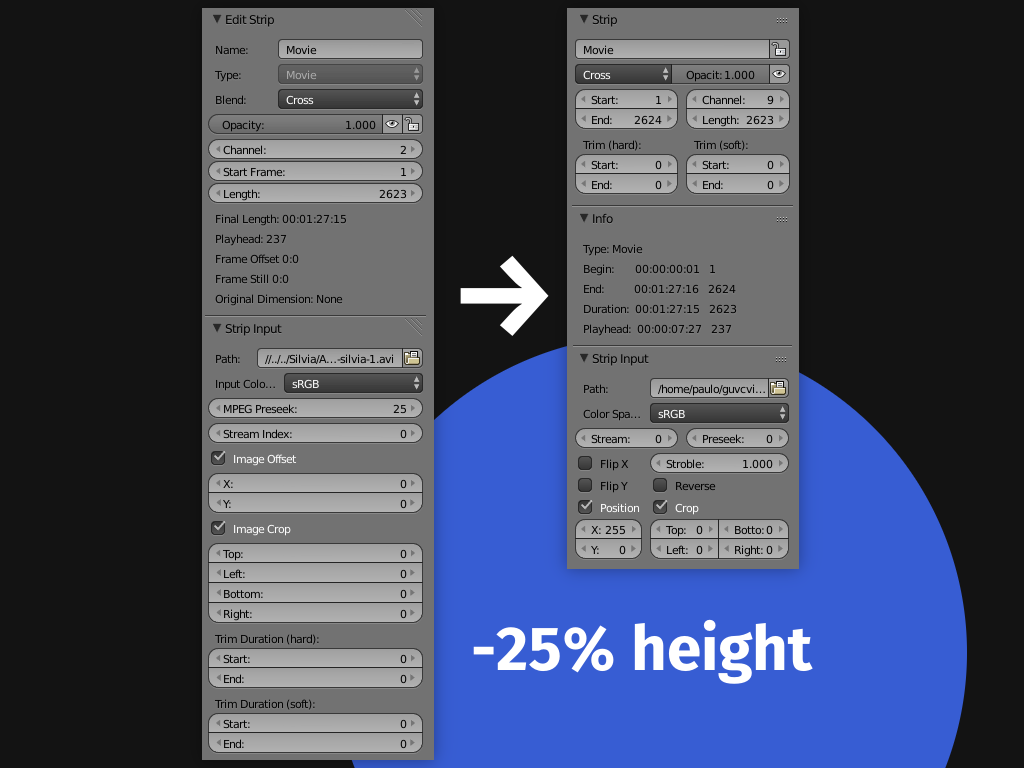
The Properties panel certainly is not the most polished in the Blender UI. It can get really big with all its options. An overall redesign could bring some vertical space back and improve usability. It can also provide something important to the user experience: consistency .
So I collected simple ideas in the the last years and tried to work them together to create a more polished UI for the VSE.

Try Yourself
The images used in this article are actual screencaps. The file space_sequencer.py holds the UI for Sequencer and I already did the scripting job. You can try the most of them right now by loading and running this script in a Blender text editor window.
Panels redesign
The Type button is always disabled in Strip Edit panel, being useless as an interaction element. It would be more appropriate to display it as part of the strip Info.
The Edit Strip panel may get the
Trim options
from Input panel, which seems to relate most with the Start and Length frame options, creating an unified UI for strip time control.

The info about
Original Dimension
displayed in Edit Strip panel seems not to be related with the strip itself, but the strip's input. It could be placed right below the input path, indicating the correct input loading. It should not be displayed for Sound, Color, Blend and Effect strips as it happens currently.

The
Info text box
could be improved by displaying more valuable info and present its values in seconds (SMPTE). Such specific info may not be useful all time, so moving it to its own panel so it can be collapsed. It can help to clean up the UI, still opening the possibility to add in the future other Info entries without prejudice.

The
Image Offset
and
Image Crop
options may use much less space. The
Flip
options from Filters panel seems to be most related to this context.

Sound strips
The Volume property of Sound strips seems to behave like the Opacity property for audio, so it should be moved to the Edit Strip panel and replace the Opacity. The Pan and Pitch properties can be placed here to keep the main audio configs together.
The
Pack
button need to keep consistency with another occurrences in the UI.

Transform Effect strip
In the Transform Effect strip panel, the
Position
and
Scale
options may use less space, and the
Translation Unit
can be expanded.

The
Input
field may be improved by showing a strip list to select, like in other areas of blender. This operation is currently only available by the Reassign operation, but this functionality is already in the Mask field of any modifier. There is nothing new to implement this idea.

There's a loop problem that is allowing to select the own strip as an input, which causes Blender to crash. Mask field has a build in function to prevent this, and in order to implement this feature it would be necessary to make the same to input fields. By the way, Mask's function isn't perfect, it allows Sound strip to be selected as a Mask.
The user experience of the
Uniform Scale
option can be improved. The current behavior is just to replace the "X" label by "Scale" and hide the Y field, what may induce the user to think this (Scale) is different property, i.e. that can be animated separately. By simply disabling the Y option, we can give correct visual feedback.

Multicam Effect
To improve the workflow using multicam strips, buttons to skip to the Previous and Next cut could be added aside the Play button. This functionality is already provide by the Jump To Cut addon, but could be integrated to give a better user experience.

Another issue is that the Cut To buttons don't deal very well with big values. But it can be easily fixed limiting its amount per row.

Add Effect
The Add Effect and other Blend effects could have buttons to Swap and Reassign inputs. The Fader option could be present in all of them.
The button
Type
could be useful to quickly change effect the type, the same way the Change Effect Type operation (menu Strip > Change > Change Effect Type). This way an Add effect could become a Multiply effect easily.

The input fields can behave like discussed in the Transform Effect, showing a list of strips to select.
Scene Strip
The Volume option should go Strip panel to be consistent with the Sound strip panel.

Speed Effect
Learning how to use the Speed Effect was a big challenge to me, mainly because its UI. Click the only visible checkbox, then another checkbox popups. Click the second, then another one! The fields name and position keep changing... How is it suppose to work?
To redesign the Speed Effect UI the approach was to keep it stable. Instead of hiding and showing elements, let's keep them inactive until the user interacts. The first field needs to be the most important one, the Speed.
The enabled Auto button means the Effect will take care of the Speed value.

Let's disable Auto, now the Speed field becomes editable and
Use as speed
is available.

If you disable, by curiosity, the
Use as speed
, the Speed value turns into
Frame
. The
Use as scale
becomes available.

Let's check
Use as scale
, now the Frame field become Scale. Pretty clear, is it not?

Did you notice the Use as speed option becomes inactive? It's because the two Use options are mutual exclusive, they don't work together.
The old UI don't prevent you of to enable Use as speed again, creating an inconsistency in the strip data. It also induces the user to think the Use as scale option depends on Use as speed being enabled. It doesn't. The proposed UI addresses this issue.
Another improvements
There's a lot to talk about it, but I'll left some images instead.
Text strip:

Proxy:

Proxy with "Use Custom File":

Modifier Color Balance:

Thank you for reading it, please like it if you like any of these ideas, and be free to discuss them.
14 Comments
Hi Paulo, these changes look really nice and align with what we are trying to in Blender 2.8. Are you still able to work on this by submitting a patch on developer.blender.org/differential/diff/create/
If not I would be glad to pick this up to get it into Blender.
Hi Blendify! I'm not able to do that, and I'll be honoured if you could get any of this ideas into Blender. Thank you! ^_^
I would love to try your script, but it's no longer available. It there anywhere I can get it? And maybe watch the missing screenshots too?
@tintwotin: Long time has passed, but I finally upated the links
Yes this should go in immediately! The pan slider is a good example of the wasted space and ill conceived layout. The pan value represents an actual left and right effect. It should demonstrate this visually.
Being you an experienced VSE user, David, I would like to know if you had the change to try this UI yourself and in that case how it had work. Any bugs or inconsistencies? Would you use it instead the build in UI?
Hi Paulo, I've noticed you're back on the community. Guess what we're a bunch of people still trying to redesign the VSE. We found out that we actually can customize not only the UI but also the functions of the VSE through python. And we have worked our way through the menus. There is some interest from the Blender Devs.(especially from the Blender dev/director Pablo V.) for our work and it may find it's way into Blender.
But the sidebar really also need a redesign and you have shared here so many wonderful ideas, however, now it is supposed to be one column like the new panels in the Preferences or the other sidebars.
If you like, we could really use your help rework that messy vse panel or anything else to improve the vse?
There is a thread on some of the thoughts here:
devtalk.blender.org/t/can-we-in-collaboration-produce-a-working-suggestion-for-improving-the-user-interface-of-the-vse/3264/50
And we discuss the developments of the vse here:
blender.chat/channel/vse
You can download and try the reworked vse menus here:
github.com/tin2tin/blender_vse_reworked
@tintwotin: thank you for letting me know about it! I really would love to join your efforts, but I don't own a machine capable of running Blender 2.8 (which requires newer versions of OpenGL), so I'm really limited to suggest things based on others experiences with the new interface. And without being able to play with the new one column design myself, I don't feel confident enough to make proposals. As soon as I find a way to get Blender working for me, I'll love to help. See you!
* @Paulo José Oliveira Amaro * I'm revisiting your panel suggestion. There are so many good ideas here, which would improve the sequencer sidebar a lot. So if you're up and running, come joins us at the VSE chat: blender.chat/channel/vse
Mixed about it; could be cool, but it mainly goes from a single column layout, to a dual / more column layout. I guess I'll try it and see how I feel :) (kudos on actually making the changes in python) BTW, in older versions of 2.5 there used to be a responsive layout where things would go dual to single depending on width, I wonder if that idea could be revived in some places.
Thank you for your acknowledgment and for showing a good point of view. Like you pointed, the proposed layout depends on a multi column feature, still the vertical space is not the only gain. But maybe it would not be an issue. I think it even stands for a more consistency with another updated panels that use the same multi column approach ( examples ). It's very nice to know about this old responsive layout. I can't recall it, even being a Blender user before 2.49. I think it explains (to me) the column_flow existence as a UI component.
Agree entirely. I was doing some video recently and had to redesign my screen layout so the panels could use the whole vertical height of my monitor.... and that still wasn't tall enough!
As the panels have been reworked in 2.8+ I guess this can be marked as done.
Can... with your permission, include these script modifications into the fork Bforartist by default? THEY ARE GREAT - and aligns with the UI design philosophy perfectly.