
Separate Dimensions from the real Transform values
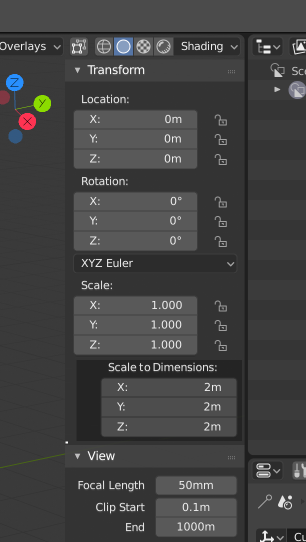
Dimensions in the N-Menu Doesn't have any direct transformation data related to it. It changes the scale to adjust to the wanted value. I think it should be clearly apart from the core transform values for clarity.
4 Comments
Actually... Since it is a tool it should be in the Resize tool. That would make more sense.
I don't understand what you're proposing.. It is exactly what it says it is. If you create a cube that is 2m on all sides, the dimensions will be 2m in each box. If you change those numbers it scales it to fit the dimensions that you explicitly requested- just like all of the other transform controls.
@eldee.smith: The Transformation values are stored on the object as their position, rotation and scale. Dimensions have no such roll. Your question about this makes me even more convinced that it need to be clarified in the UI. The Dimensions are not an attribute... it's a tool for scaling.
@testure: :) Ok, so if you have 2m cube how the hell are going to scale that to 1.48m by X, 4.378 by Y, and whatever the number the client require by Z. I guess you are going to jump on the calculator and start molesting the keypad. The scale is NOT EQUAL to size/dimension. There is got to be a box that says Size: X=... | Y=... | Z=..., and those numbers must not reflect THE SCALE since the scale is e number that relates to the parts of the size, not the size itself.