
Simplifying the "delete workflow in Edit Mode" in Blender (UI change suggestion)
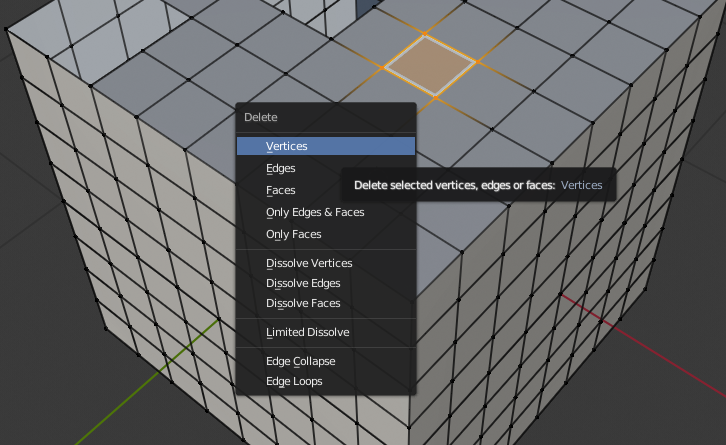
In Blender currently we have to click "x" and choose from a menu to delete in edit mode. This could be simplified easily I think. Just pressing "x" after selecting an edge/s or vertex/vertices would just delete it away with any faces linked with it If it's a face you selected than it would delete that faces or faces. Pressing "SHIFT + x" would dissolve edges, vertices, or faces. And "CTRL + x" would bring up the traditional Blender "delete menu". Comment any suggestions you might have to perfect this idea. And if any developer decides to implement this in Blender please let me know in the comment section, cause otherwise I'll be on tender hooks xD. Thanks.
6 Comments
use X > 1 or 2, 3..
I do use smart delete and once you get used you don't need anything else I think there is just one situation where you require to access the menu. You just need to learn which mode you need to have selected in order to delete or dissolve. I use it in combination with F for some reason I don't remember now. :D
<kbd>Ctrl</kbd><kbd>X</kbd> already does dissolve.
Why not keep this sortcut for dissolve and use <kbd>Shift</kbd><kbd>X</kbd> for the whole menu instead?
@loic.dautry: that's all right, but since they are already making UI changes in 2.8, I just thought this could work since SHIFT + x seemed more easier to press than CTRL + x. Wouldn't make much of a difference anyway though. :)
@loic.dautry:
I have to ask. Where do you guys find those new shortcuts to these random things? It's been for me so hard to know those because those are not visible anywhere. (for example tooltip)
Some are visible in the menus :
And every shortcut is listed in the input tab of user prefs :