
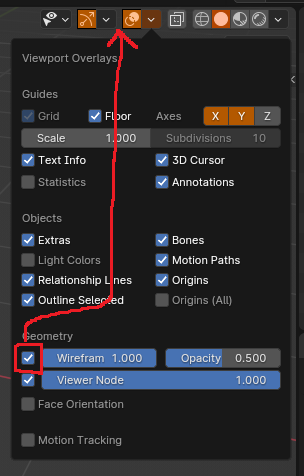
Wireframe Overlay toggle button
I regularly toggle wireframe overlay in my workflow and it would be a big help to add a toggle to differentiate wireframe overlay with from other overlays.
This would just be to add a dedicated button next to the Show Overlays toggle.
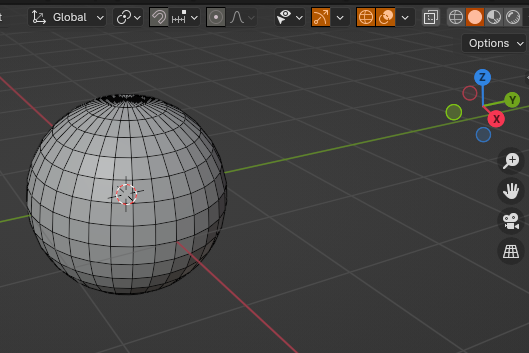
Update: I learned python. File to edit is at Blender Foundation\Blender 4.0\4.0\scripts\startup\bl_ui\ space_view3d.py
This is the block to edit:
    # Overlay toggle & popover.
    row = layout.row(align=True)
    row.prop(overlay, "show_overlays", icon='OVERLAY', text="")
    sub = row.row(align=True)
    sub.active = overlay.show_overlays
    sub.popover(panel="VIEW3D_PT_overlay", text="")
This is what I change it to:
   # Overlay toggle & popover.
    row = layout.row(align=True)
    row.prop(overlay, "show_wireframes", icon='SHADING_WIRE', text="")
    sub = row.row(align=True)
    if overlay.show_overlays == False:
        row.active = False
    sub.active = overlay.show_wireframes
    sub = row.row(align=True)
    row.prop(overlay, "show_overlays", icon='OVERLAY', text="")
    sub = row.row(align=True)
    sub.active = overlay.show_overlays
    sub.popover(panel="VIEW3D_PT_overlay", text="")
 #
#
6 Comments
Add shortcut ¯\_(ツ)_/¯
I've personally mapped Ctrl+W and i use it very frequently.
This is A solution, but not really the one I would like. I'm a visual interface user. Hotkeys are great, but I would rather have a button.
Just add it to quick favourites
It's an option, but I'd prefer a visible button. Are you opposed to the suggestion, or are you just offering alternate solutions?
maybe roll this into an addon? it seems rather specific to clutter the headerbar with one special button for everybody.
Addons can only append buttons to very end of bar. And there is no way of adding it in between existing buttons.