
Curves - Spline slide
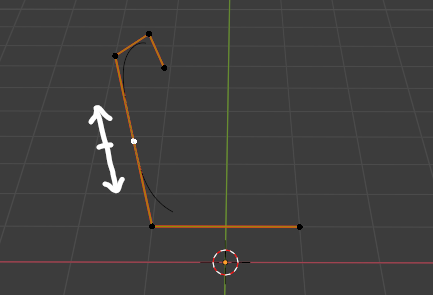
Enable hitting double G for sliding a knot (control point) along a spline in NURBS curve / path mode just like edge slide when editing vertices in mesh.
In bezier curve mode maybe use a virtual shortest route (poly curve) between selected control point and its closest neighbors to use as a slide path. This second part is just hypothetical.
4 Comments
I also struggle with such thing, actually blender should properly work on curves as they are fundamental in designing work. Auto-smooth is also another good feaure.
I agree it would be nice, however for now you can transform along normal, it is similar to edge slide when moving along the normal Z axis
* @crnknstn * Thanks, yes, you're right. It could have exactly this function, just without the hassle of switching it at the top all the time. It would also bring more parity to the operations model.
* @Dest * A few line python code can do this. For example: 1. If we press GG in curve edit mode, blender should temp. enable normal transformation. and when we click to confirm, it should revert the transformation gizmo to the previous state.