
Dyntopo - Better scale input in Constant Detail mode.
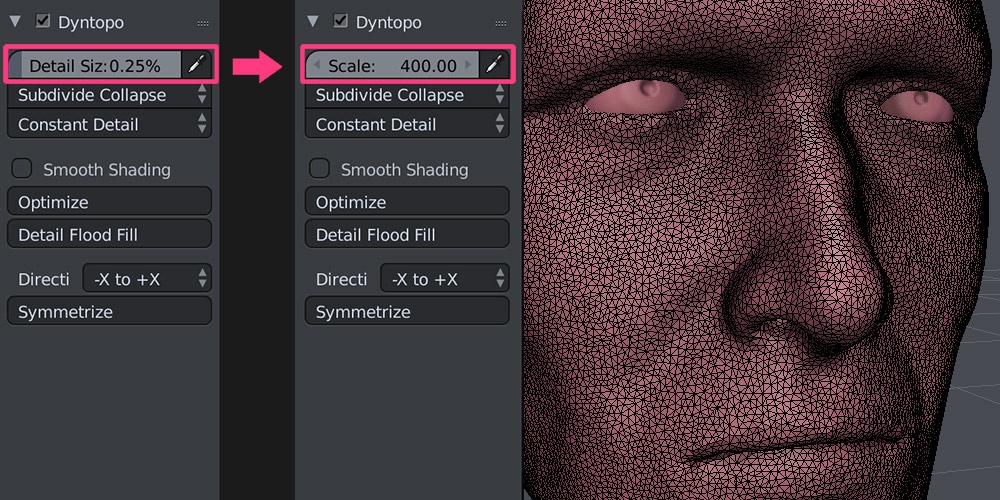
Detail Size value in Constant Detail mode is expressed as percentage of one blender unit . This may seems logical at firs glance but is very cumbersome in practice. Thing is, if you sculpt you want some mesh resolution to work with. By default one blender unit equals one meter and this mean you have set this value to 1% to get triangles of size of one centimeter, if you want to work with reasonable scale. This of course is not enough if you want to add any detail on smaller objects, for example, human head. In this case you need to operate on values vastly below 1% and input everything using keyboard. Current slider is also bad at incremental resolution changes. Switching from 0.2% to 0.1% mean doubling the resolution and may crash blender if you run Detail Flood operator.
I propose to change this slider to value that divides one blender unit . If you set it to 10, you will get triangles of size 1/10 of blender unit. In practice, you put 10 to work on decimeters, 100 to work on centimeters and 1000 to work on millimeters. If you want to make huge objects like landscapes you may set it to 1 (one meter) or even 0.1 (10 meter triangles). The bigger value is the denser mesh will be. Same logic as defining texture resolution, subdivision levels or remesh depth.
Slider should starts value close to zero (can't divide by zero) and goes to infinity. With this design setting resolution and all incremental changes will be convenient at any scale from meters to millimeters.
EDIT: To avoid confusion we need to rename this value to "Resolution" instead of "Size" or "Scale".
1 Comment
Good evening! Could you explain a bit more definite this question about the unity of the blender with respect to the constant detail in its resolution in the dynamic topology? I do not think video tutorial.