
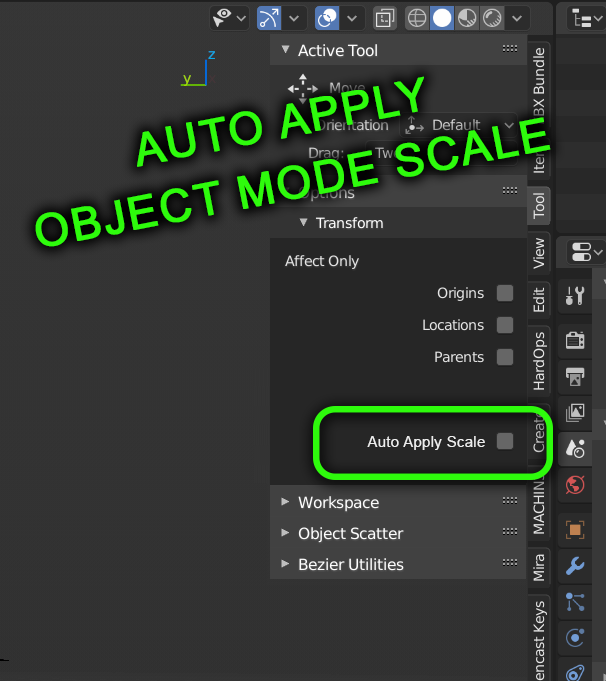
The Option To Auto Apply Scale in Object Mode
We're all aware of the importance of keeping your object's scale to 1,1,1 so that tools that edit the geometry based on a unit measurement behave correctly and uniformly.
Why not have a toggle in the Options (with Affect Only and such) that basically keeps the object's scale to 1,1,1, or rather applies the scale, after scaling an object in Object Mode?
I don't know why this isn't in Blender already! Think of the fresh beginner lives we would save...
23 Comments
Here is a script that my friend Arsides on Discord made as a mockup: try this for yourself. (Download this text file here and stick it in your addons folder ->) {attachment AutoApplyScalepy}
The button should appear in N Panel > Item > Scale Tools
Where is this code? I don't see anything here
Because applying scale is rewriting each vertex position . It is intensive operation and should not be applied any time. Also when you applying scale, there will be tiny error. And it will be accumulated during time. If you want to work in one scale, do it in edit mode. And idea of Blender is not to do extra calculations and extra code.
So may be, as option with warning.
* @ Vyacheslav * good info, thank you. That makes sense that it is more intensive. Would it be sensible to only apply scale after confirming a scale change, or after you're done sliding/inputting a value in the object dimensions field? That way it only applies once or twice, and is not being calculated constantly.
* @ Vyacheslav * so for now we just scale in edit mode. Isn it too hard for blender? 3d modeling is constant overriding vertex positions..
* @ Vyacheslav * Thas a huge good point. Besides, Blender is already struggling with viewport performance and the issues scales up a lot with large scenes and/or dense objects.
* @impacman *
Yes but not every single vertices of the entire mesh at every single action you make.
* @-L0Lock- * if you grab around one vertex, yep u right. If you scale, rotate or move objects around, how many vertexes change positions? All of them
Finally a good Explanation for this. Thank you
Though I like the idea, I'm not sure this is something aimed at beginners. They need to be aware of scalr matters. This shouldn't be portrayed as something for beginners, because they shouldn't rely on this tool as a way to not learn about scale & objects management.
* @-L0Lock- * I understand the concern. They need to understand why certain operations function the way they do, and like the thread that @TheRedWaxPoloce mentioned, I completely agree.
But fine, let's not aim it towards beginners then, but to expert users who understand this concept. If I ever scale anything in object mode, I only ever do it intentionally knowing that I'll need to apply it when I'm done.
Why not just get rid of the step when most users know they'll be wanting a uniform scale anyway? And keeping it as an option , allows the user to decide the behaviour. By default, it would be off. But for everyone who understands, it's just another annoying unnecessary step.
Much more elegant if it just reset to 1,1,1 after every action. I'd love that. I could use the dimensions fields and not have to worry about Ctrl+A > Scale every. Single. Flipping. Time.
But yeah, the beginner comment in the original post was mostly a laugh because if you've ever worked with many beginners, this is the root of so many problems. It's not really aimed at any particular skill level.
Check this demo out! {attachment 2020-08-17_22-30-45mp4}
It was almost a year before I learned about apply scale :( At the very least the first video in the Blender beginners playlist should mention it.
Almost half of the questions asked on the r/blenderhelp subreddit have to do with scale issues. Almost filling the other half are "why is my material pink?"
* @dpdpforlife * Yyyyeep. Imagine if they were to be pointed to this checkbox. This would cut down so many problems. Isn't that what we want in a good software package?? And they can still learn why it's important.
* @dpdpforlife * Since february 2019 I have watched and read several hundred blender tutorials and probably less than a dozen of them make any mention of the importance of applying scale. There are several youtube channels with scores or even HUNDREDS of timelapse videos, people who have used Blender for YEARS and not once have I ever seen them apply scale. On DOZENS of occassions I have seen them do a bevel or an inset that is clearly afflicted by not applying scale and they just roll with it. I am certain there are many somewhat experienced blender users who still do not know about it.
Ideally, this is what it would fix. The dimensions fields are super useful, but it changes the dang scale every time. {attachment dimensions2jpg}
** Edit -- I found out that GIFs don't play. I posted a comment with a notated screenshot **
Ideally, this is what it would fix. The dimensions fields are super useful, but it changes the dang scale every time. See the GIF below {attachment Dimensionsgif}
devtalk.blender.org/t/mesh-tools-and-non-uniformly-scaled-objects/2580
* @TheRedWaxPolice * yep, I agree with all of this, and completely understand why the tools function the way they do and support that.
What I am asking for though is removing the unnecessary step for people who already understand it (and for beginners who just want to make things and have this be a problem -- they can still learn to understand why to check this rather than just running into constant problems, ask any Blender teacher).
This simply just speeds up the process when most users know they want a uniform scale 99% of the time. I can't think of hardly any situations where I ever want a non-uniform scaled object. So... Why not provide an option to just never have it be non-uniform?
So simple and elegant!)
I particularly have become really fond of the Dimensions fields of the object under the Item sidebar tab recently, and I wish I could change those (in Object mode for ease) without having to worry about the uniform scale.
* @Joseph Burgan * But this proposal isn't about the dimensions fields. The primary concern is that object mode scale doesn't have to be so tedious if we can just auto apply it. At least the option to do so... Surely there's a way we can just auto apply the scale after a scaling action has taking place in Object mode. I could probably hack something in but I'm an artist, not addon developer. ... though I'm starting to think I should become more of an addon developer...