
Shapes for emptied common objects.
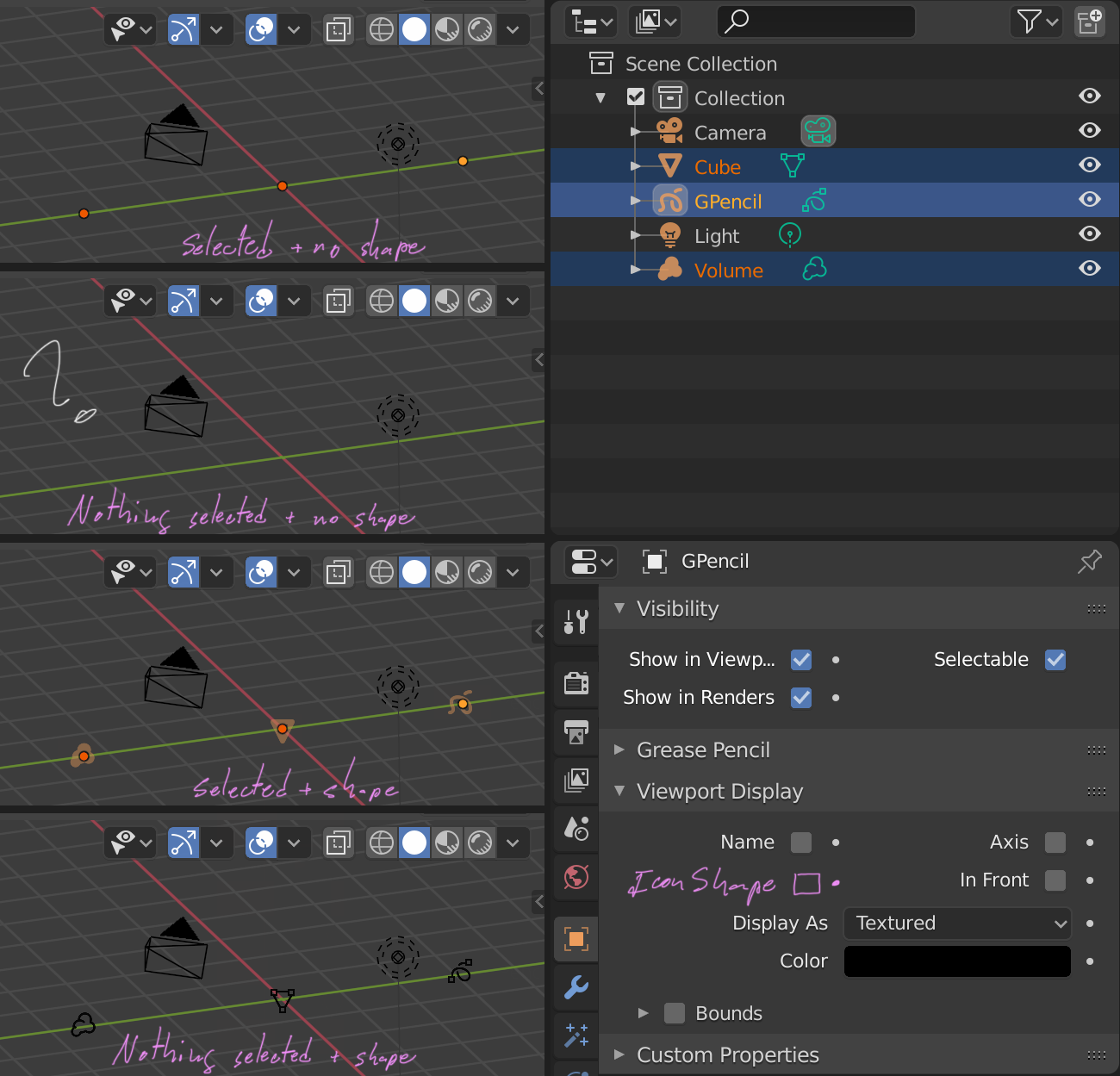
When common objects are empty (not Empty Objects), they are not rendered in the 3D viewer, they cannot even be directly selected as there is nothing.
I think at least some way should be shown to indicate the position and type of the object, and be able to select it. The iconic shape should automatically show when emptying the object.
8 Comments
Great proposal even if I don't see why empty object containers should exist exposed in the first place. I get that they are a byproduct of blenders data management but why not hide them also from Outliner and delete them like it happens with unassigned materials on file close?
* @Ge Ro * Sometimes it is convenient to start with an empty object, such as in Grease Pencil to trace from scratch, or in meshes to start retopology from a vertex. Although I think that if you want to delete an object as such, it is easy to do if you can identify it, but it would not hurt to purge them.
The guy that set up Maya's modelling tools back in the 90's was thinking the same way -- "Why would anyone want to make an edge with no face attached? Or a vertex with no edge attached? That's stupid. I'm going to make it impossible to do!" Needless to say, Maya doesn't support wire edges, which makes it tedious to do a lot of modelling tasks that are simple in other softwares.
Having empty containter objects can be a good thing, and will probably be really useful when Everything Nodes is finished.
* @Josephbburg * Thanks and I see your point. My question was a bit more specific to the case where the empty container is unselected, out of edit mode and not involved in active background operations. At this moment there is no way of filtering this kind of object without scripting. @wevon Maybe the proposal should extend also to the Outliner by changing the icon aspect in the list or adding a filter command.
* @Ge Ro * It would be great if you could filter them in the outliner!
it is great, how could blender distinguish what object have no data? or this icon will be available for all objects?
and where the Icon shape could be stored? why not use a empty and display a instanced collection not able to render?
* @david rodriguez * Some objects such as cameras and lights are always full and are already shown schematically. Meshes, curves, metaballs, surfaces, even new types of objects such as volumes, point clouds and hair could be empty. Obviously the program cannot be continuously verifying if the object is empty, it should only be checked when generating the object or when removing components from it.
The icons can be reused from Outliner I guess. I think that although objects can be viewed as boxes, the box depends on the size of the object, and if it is null, the size of the box as well. Showing them all in the form of a cross is an option but I think that something more informative would be better. As for the rendering options, I think that obviously they should not be rendered, but the visibility should be controlled separately, since most of the time these objects are empty for a short period of time, upon initialization or by mistake.
* @ wevon * I see, perhaps a set of "Icon objects" with common shapes stored in the blend file , it will need a menu to chose one icon from all the available