
More control over "Auto Depth" navigation
For the avoidance of doubt, here is the description of the feature in question from the Blender documentation.
"Auto – Depth
Use the depth under the mouse to improve view pan, rotate, zoom functionality. Useful in combination with Zoom To Mouse Position."
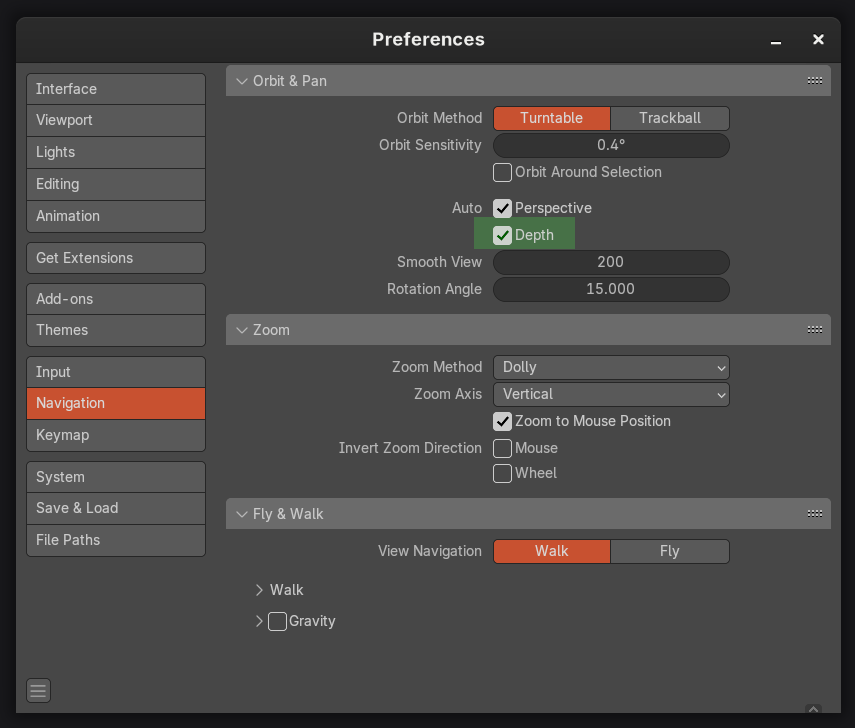
I love this feature because it makes moving around complex scenes very easy and precise. However, there are a few exceptions where this tools behaviour could be improved upon.
Here are some examples:
-
A large fog cube volume that is set to "bounds" in my scene, the auto-depth will often find this object (due to it being the first object in the depth order from the camera perspective) and cause my camera to move in a way that is not useful.
-
A large terrain/environment that spans many meters or even miles. The auto-depth will again often pivot my camera movements awkwardly due to the distant objects being found by the ray that is projected from the camera view. (I'm aware this is expected behaviour as this is what the tool does, but my point is that it's not always useful without more granular control.)
-
A scene with many scattered objects causes a huge drop in fps/hangs the scene when the camera is moved due to the massive amount of geometry that needs to be evaluated. In scenes like this, I need to disable this feature to get good performance or use other workarounds.
Here's my suggestion - Enable the user to control when the ray gets fired from the camera, this way, the pivot change event does not occur during every camera movement. The user can then decide when they need to alter the viewport camera pivot based on their scene requirements. This makes the feature far more performant without compromising functionality.
Another useful addition would be to allow the user to exclude objects or whole collections from the Auto-Depth behaviour.
Failing any of these improvements, please allow this preference to be mapped to a hotkey via the right click menu.
2 Comments
Good proposition.
I have been struggling with this feature for a while; I believe it can get improvement(s).
Here is an idea I've just got while reading your request:
A "Maximum Distance" Slider Button setting, which defines the Radius of an Invisible Sphere irradiating from the Current (3D World) Location of the user in the Viewport. It would work like this: for example, if I'm looking from the Viewport in a Scene containing multiple Objects, some of them are nearby (about 5m), while some others are much further away (about 50m), then I set that "Maximum Distance" to, say, 10m; whenever I 'miss-click' [it's Orbiting, right], with the Auto Depth Option, at an undesired, very Distant Object, beyond the adjusted Maximum Distance limitation, it will not Auto-Depth in that case; only if I command the Orbiting on Objects within the Range of the Radius [corresponding to the "Maximum Distance" value].
I came to that idea, because this was causing me so much problems in a Scene, that I decided to Add an UV Sphere Mesh Object, Scale it around my 'region of work', set that Object to Display As: Wire (unsure now if it works with Wire), make it Unselectable in the Outliner (I think this too), then Navigate to bring the Viewport inside this small ecosystem. Within it, I would be able to manipulate anything inside with Auto-Depth, but not Auto-Depth accidentally anything outside the UV Sphere... not great as a Workflow, but it worked. Naturally, by developing for the Auto Depth Option an in-built feature such as an 'Invisible Radius-Adjustable Sphere from the Viewport Location in 3D Space' (containing the "Maximum Distance" adjustable feature), all that stuff could be made more spontaneously; I wouldn't need to create a single UV Sphere Mesh Object that would make the Scene more complicated, it would be all based in intra-calculations of Blender.
Feel free to incorporate or transform this idea if you find anything better. I believe it can complement what you have.
Thanks.
Looking at the 4.5 release notes, the request to exclude objects from the auto depth evaluation has been addressed.
Go to 23mins:
youtube.com/watch
It would be still be good to control when the ray gets fired for heavy scenes though.